
Subtotal $0.00


In today's complex IT landscape, Zero Trust security is a strategic approach built on a simple but powerful principle: "never trust, always verify." Instead of assuming everything inside an organization's network is safe, this model treats every access request as a potential threat. It demands strict, continuous verification for any user or device attempting to connect to your systems, regardless of their location.
Rethinking Security From the Ground Up
For decades, businesses relied on a "castle-and-moat" security model. The primary objective was to build a strong perimeter—using firewalls and VPNs—to keep threats out. Once a user was safely inside the network walls, they were generally trusted.
But that model is no longer effective. In a world of remote work, cloud services, and mobile devices, the traditional network perimeter has all but disappeared.
The hard truth is that attackers are becoming more adept at slipping past these legacy defences. In 2023, UK Government statistics revealed that 50% of all businesses faced a cybersecurity breach or attack. That figure rockets to over 70% for medium and large enterprises. These numbers don't just tell a story; they are a clear warning about the critical flaw in the old model: once a threat gets inside, it often has free rein to cause significant damage. You can read more about the growing need for modern cybersecurity frameworks to understand the full scope of the challenge.
Why Zero Trust Matters for Your Business
Zero Trust flips the traditional security model on its head. Imagine trading the castle for a high-security government building. In this new scenario, it doesn’t matter if you're a first-time visitor or the CEO; you need to prove your identity and authorisation at every single door you try to open. That's the essence of what Zero Trust security achieves in your IT environment.
This strategic mindset assumes that a breach is not a matter of if, but when. By enforcing verification at every step, it dramatically reduces the potential damage an attacker can cause, limiting their ability to access sensitive data or move across your network.
Introducing the Three Foundational Pillars
So, how is this concept applied in a real-world IT environment? Zero Trust isn't a single product you can buy off the shelf. It’s a framework—a way of thinking—implemented through a combination of intelligent policies and the right technologies. It all comes down to three core principles.
To give you a clearer picture, here’s a quick summary of what each pillar means for your organization.
Zero Trust Security at a Glance
| Core Concept | What It Means in Practice |
|---|---|
| Verify Explicitly | Always authenticate and authorize access based on all available data points. This includes user identity, their location, device health, and the sensitivity of the resource they're trying to reach. |
| Use Least Privileged Access | Grant users only the specific access they need to do their jobs, and only for as long as they need it. This dramatically minimizes each user’s potential exposure if their account is compromised. |
| Assume Breach | Operate as if an attacker is already inside your network. This means segmenting networks to stop threats from spreading, encrypting all communications, and using analytics to spot trouble early. |
These principles guide every security decision in a Zero Trust environment. Successfully implementing this framework requires a shift in thinking and, more often than not, the kind of structured IT support needed to build a scalable and genuinely secure system.
The Three Foundational Pillars of Zero Trust
To truly understand what Zero Trust is, you need to look at the three pillars it’s built on. These aren’t separate pieces of tech, but a set of guiding principles that work together to create a modern, robust defence. When you move past the theory and see how they’re applied in a business context, their real value in protecting your organization becomes crystal clear.
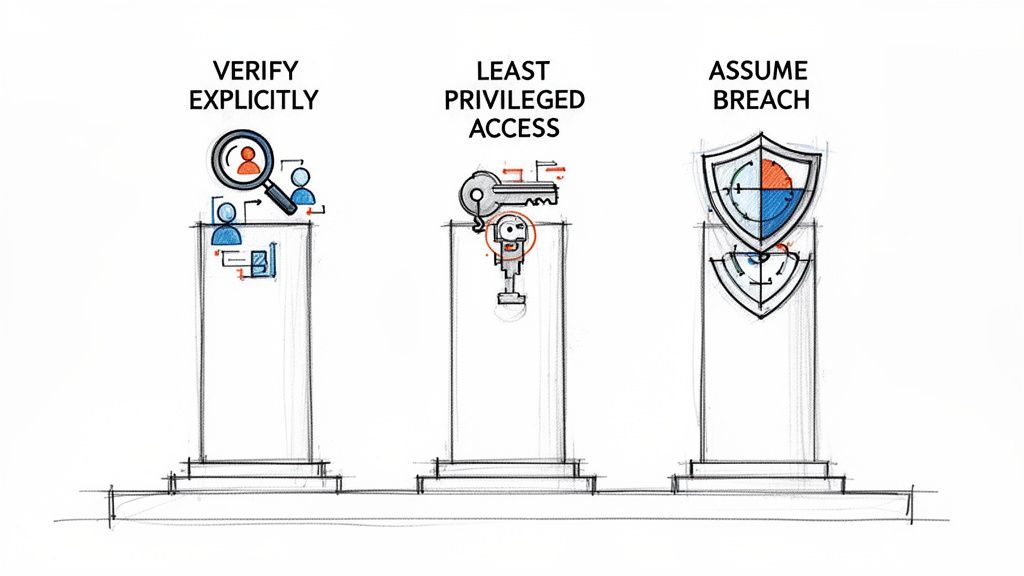
These principles are the strategic core of any successful Zero Trust architecture, ensuring your security is dynamic, specific, and resilient.
Pillar 1: Verify Explicitly
The first and most important pillar is to verify explicitly. This means every single request for access must be authenticated and authorized—every single time, without exception. It completely dismantles the outdated idea that a user’s location on the network, whether inside or outside the office, is a reliable sign of trust.
Instead, a Zero Trust approach gathers and analyzes a rich set of data points before granting anyone access. This is a far more intelligent process than simply checking a password.
Real-world verification signals include:
- User Identity: Is this a known user? Can they prove it with multi-factor authentication (MFA)?
- Device Health: Is the device they’re using managed by the company? Is its antivirus up to date and are all security patches installed?
- Location: Is the user connecting from a typical location, or is this an unusual or high-risk country?
- Application & Data Sensitivity: Are they trying to open a general marketing document or highly sensitive financial records? The level of verification must match the risk.
This dynamic, context-aware verification is at the heart of modern security. Getting it right often means unifying these signals through platforms that offer secure access from any device or location, creating a consistent defence no matter where your people are working.
By constantly checking these real-time signals, the system makes an intelligent access decision. If a manager tries to access a sensitive HR file from an unrecognized personal device on public Wi-Fi, the system can automatically block them or demand more proof of identity, even if their password is correct.
Pillar 2: Use Least Privileged Access
Once a user or device is verified, the second pillar, use least privileged access, comes into play. This principle states that users should only be given the absolute minimum level of access they need to perform their job, and nothing more. This simple idea drastically shrinks the potential damage if an account is ever compromised.
To make this happen, organizations must move away from granting broad, static permissions. The future of access control is dynamic and granular.
Key concepts here include:
- Just-Enough-Access (JEA): This ensures users can only perform specific tasks relevant to their role. For example, a finance team member might be able to view invoices but not approve large payments.
- Just-In-Time (JIT) Access: This provides temporary, elevated permissions for a specific task and for a limited duration. An IT administrator might receive server access for a two-hour maintenance window, after which their permissions are automatically revoked.
This approach prevents an attacker who has stolen one person’s login details from roaming freely across the network to hunt for valuable data.
Pillar 3: Assume Breach
The final pillar, assume breach, is a profound shift in mindset. It forces you to operate as if an attacker is already inside your network. This proactive stance means you build defences designed not just to keep attackers out, but to minimize the "blast radius" when a breach eventually occurs.
Assuming a breach means you can never become complacent. It drives specific technical actions designed to contain and neutralize threats quickly.
Practical ways to apply this pillar are:
- Micro-segmentation: This involves dividing the network into small, isolated zones. If one segment is compromised, the attacker is trapped and cannot easily move to other parts of the network, like the server holding your customer data.
- End-to-End Encryption: All data, whether it's stored on a server (at rest) or moving across the network (in transit), must be encrypted. This renders the data useless to an attacker even if they manage to intercept it.
- Threat Analytics: Continuously monitoring network traffic and user behavior for anything unusual helps you spot and respond to potential threats in real time, before they escalate into a major incident.
By building your security strategy on these three pillars, you create a system that’s ready for modern threats, protecting your critical data and building genuine operational resilience.
How Zero Trust Replaces Outdated Security Models
To fully appreciate why Zero Trust is so critical, it helps to look at the security model it's leaving behind. For years, businesses operated on a "castle-and-moat" strategy. The idea was simple: build a strong, rigid perimeter with firewalls and VPNs to keep the bad guys out. If you were inside the network, you were trusted by default.
This approach made sense when everything—your servers, data, and employees—was physically located within the office walls. But today’s business landscape is completely different. Your applications live in the cloud, your data is accessed from anywhere, and your team might be spread across the country or even the globe. The "moat" has become obsolete because there’s no single castle left to defend.
Threats have also evolved beyond simple frontal assaults. Modern attackers target supply chains, exploit insider accounts, and use sophisticated phishing campaigns to walk right in with stolen credentials. Once they’re past the perimeter, the old model puts up very little fight, allowing them to move laterally across the network with frightening ease.
The Problem with Implied Trust
The fatal flaw in the castle-and-moat approach is its reliance on implied trust. It’s a binary worldview: "inside equals safe" and "outside equals unsafe." That assumption isn't just outdated; it's actively dangerous. A single compromised employee account or an infected laptop connected to the Wi-Fi can become the launching point for a massive data breach.
The reality of modern work has exposed these cracks. UK IT professionals are sounding the alarm, with a staggering 71% listing security as their top priority, according to a recent UK and Ireland IT Survey. This urgency is fueled by an estimated 33 billion global account breaches—a tidal wave that perimeter defences were never built to withstand. It's easy to see why experts stress a shift to Zero Trust in the face of these growing threats.
Adopting a Zero Trust architecture isn't just a technical tweak; it's a complete strategic pivot. It’s built on the realization that trust is a vulnerability. Security has to be dynamic, continuous, and explicitly earned—never assumed.
A Clear Comparison of Security Philosophies
The difference between these two models isn’t just technical; it's philosophical. It represents a fundamental shift from protecting a location to protecting identities and data. Where you are connecting from matters far less than who you are and what you’re authorized to do.
Let's break down the core differences.
Comparing Security Models: Traditional Perimeter vs. Zero Trust
The table below draws a sharp contrast between the old way of thinking and the modern, identity-centric approach of Zero Trust.
| Security Aspect | Traditional Perimeter Model | Zero Trust Model |
|---|---|---|
| Trust Assumption | Trusts devices and users within the network perimeter by default. | Never trusts, always verifies. Treats every access request as a potential threat, regardless of its origin. |
| Access Control | Provides broad, network-level access once a user is inside the perimeter. | Grants access based on the principle of least privilege—only what is needed, for as long as it's needed. |
| Verification | Primarily verifies identity at the point of entry (e.g., VPN login). | Continuously verifies identity, device health, and other signals for every single resource request. |
| Threat Focus | Concentrates on preventing external threats from breaching the perimeter. | Assumes a breach has occurred. Focuses on containing threats and minimizing their potential impact. |
| Network Visibility | Has limited visibility into traffic and activity inside the trusted network. | Aims for complete visibility of all traffic, using analytics to spot anomalies and threats in real time. |
This comparison highlights a profound evolution in security thinking. We're moving away from brittle, wall-based defences towards a flexible, intelligent framework designed for the messy reality of modern IT. Getting this transition right means weaving security into the very fabric of your organization, not just bolting it on as an afterthought.
A Practical Roadmap for Implementing Zero Trust
Putting theory into practice is where the real work of strengthening your organization's security begins. Adopting a Zero Trust framework isn’t a one-time project; it’s an ongoing journey. A phased approach is the best way to get there, preventing disruption while building steady momentum. And for businesses already in the Microsoft ecosystem, there's a clear path forward using powerful tools you may already have.
This roadmap breaks down the implementation into structured, manageable stages. By tackling Zero Trust in logical steps, you can build a truly resilient security posture without overwhelming your team or your budget. It’s all about making incremental, high-impact changes that shrink your risk profile over time.
This visual shows just how much security thinking has evolved, moving from outdated castle-and-moat defences to the modern, distributed model that Zero Trust champions.
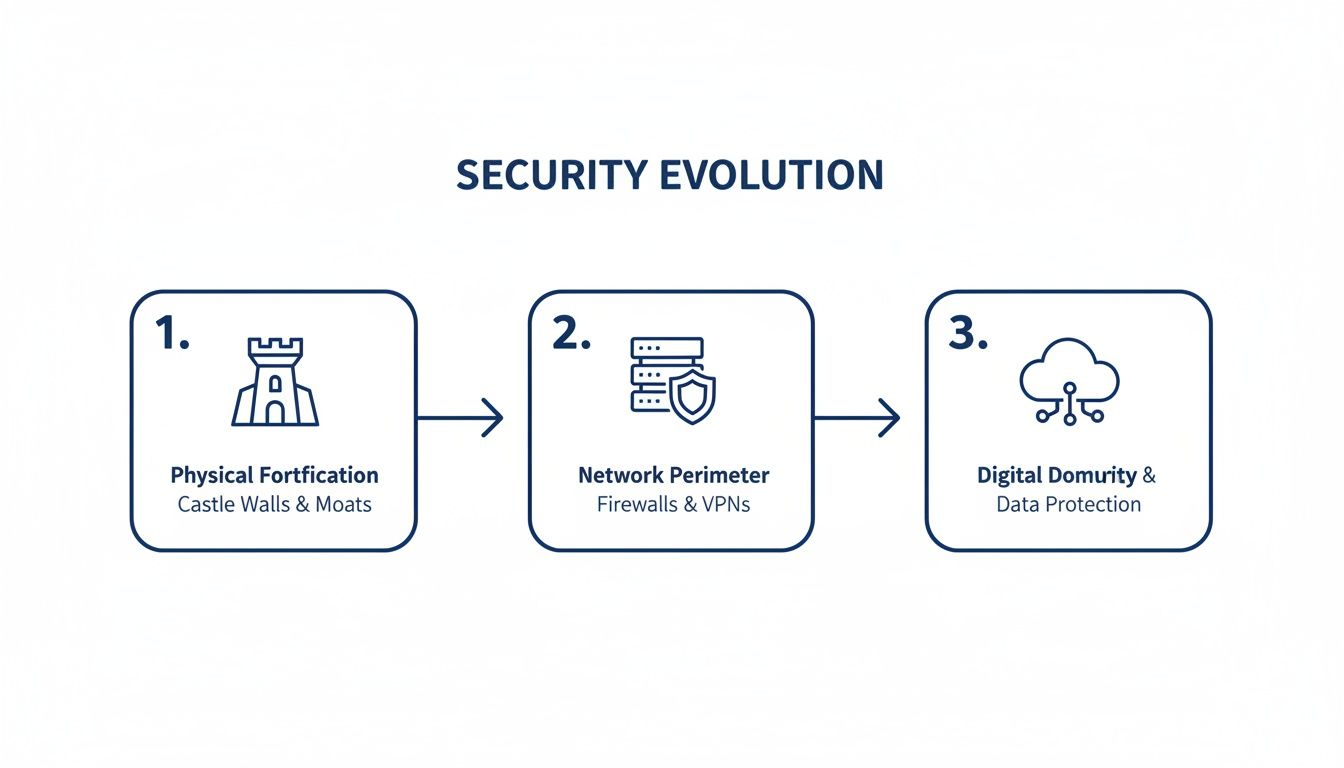
The key takeaway is simple: security now must follow the data and the user, wherever they are, rather than being bolted to a physical location.
Stage 1: Secure Identities as the New Perimeter
The first and most foundational stage is securing user identities. In a Zero Trust world, identity is the primary control plane. If you can't be certain who is asking for access, none of your other security measures matter. This phase is all about establishing strong authentication and creating dynamic, context-aware access policies.
The core tools for this job are right there in the Microsoft security stack:
- Microsoft Entra ID (formerly Azure AD): This is the bedrock of your identity management. It brings together all your user identities—whether they're on-premises or in the cloud—into a single, authoritative source.
- Multi-Factor Authentication (MFA): This is the single most effective step you can take to secure identities. By enforcing MFA across all accounts, you make it 99.9% less likely for an identity to be compromised by an attacker with a stolen password.
- Conditional Access Policies: This is where Zero Trust truly comes to life. Conditional Access acts like an intelligent bouncer at the door, checking signals like user location, device health, and sign-in risk in real-time to make access decisions on the fly. You could, for instance, block access from unmanaged devices or require MFA when someone connects from an unfamiliar network.
Getting this stage right means every access request is scrutinized, finally moving you away from the flawed assumption of implicit trust. For a deeper dive, check out our overview of a Microsoft Zero Trust implementation.
Stage 2: Protect Endpoints and Devices
Once identities are locked down, the next logical step is to ensure the devices accessing your data are healthy and compliant. An unpatched laptop or a compromised mobile phone can easily create a hole in even the best identity controls. This stage is all about gaining visibility and control over every endpoint.
The primary tool for this is Microsoft Defender for Endpoint. It provides an arsenal of advanced threat protection capabilities, including:
- Threat and Vulnerability Management: It continuously discovers, prioritizes, and helps you remediate vulnerabilities on all your devices.
- Attack Surface Reduction: This hardens your devices by controlling which applications can run and blocking common malware delivery routes.
- Endpoint Detection and Response (EDR): This allows you to detect and investigate sophisticated threats, giving you the tools to respond to security incidents rapidly.
When you integrate Defender with your Conditional Access policies, you can create powerful, automated rules. For example, you can block a device from accessing company data until a threat detected by Defender has been resolved.
Stage 3: Safeguard Your Data
With identities and endpoints secured, the focus shifts to the crown jewels: your data. This is what attackers are ultimately after. This stage involves understanding where your sensitive information lives, classifying it properly, and applying protective policies that stick to the data itself.
The key technology here is Microsoft Purview. It helps you:
- Discover and Classify Data: Automatically finds sensitive data, like financial records or personal information, no matter where it resides in your digital estate.
- Apply Sensitivity Labels: These labels apply protection policies, like encryption and access restrictions, that travel with the file wherever it goes—even if it ends up outside your network.
- Prevent Data Loss (DLP): You can create policies that prevent users from sharing sensitive information where they shouldn’t, whether it’s through email, Teams, or other channels.
Stage 4: Monitor and Automate Responses
The final stage ties everything together. The "Assume Breach" mindset requires constant visibility across your entire environment to spot and react to threats, ideally automatically.
Microsoft Sentinel acts as the central nervous system for your Zero Trust architecture. As a cloud-native Security Information and Event Management (SIEM) solution, it does the heavy lifting:
- Collects Security Data: It pulls in logs and alerts from all your Microsoft tools (Entra ID, Defender, Purview) as well as third-party sources.
- Detects Threats with AI: It uses intelligent analytics and machine learning to spot suspicious behavior and uncover complex attack patterns.
- Automates Response: It can orchestrate automated playbooks—like disabling a compromised user account or isolating an infected device—to contain threats in seconds, not hours.
By following this phased roadmap, any organization can methodically build a robust Zero Trust framework. While each stage delivers immediate security wins, their true power is unleashed when they work in concert, creating a unified and resilient defence. Navigating this journey is often smoother with an expert guide to ensure the technology is perfectly aligned with your specific business goals and security needs.
Navigating Common Challenges and Best Practices
Making the switch to a Zero Trust architecture is a major strategic decision, and it's not always a straightforward path. While the security payoff is massive, you're bound to encounter practical hurdles along the way. From our experience guiding organizations through this process, we’ve learned that anticipating these difficulties and planning for them is what separates a successful rollout from a stalled project.
One of the first challenges many businesses face is integrating legacy systems. Most companies run on older applications that were built long before modern identity protocols existed. These systems can't natively "speak" the verify-explicitly language of Zero Trust, which can create security gaps or disrupt operations. The answer isn't to rip everything out and start over. A much smarter, phased approach—using tools like application gateways or proxies to act as modern authentication bridges—is the practical way forward.
Another critical piece of the puzzle is the user experience. If new security measures are clunky and frustrating, your team will find workarounds—undermining the entire framework. The goal is to make robust security feel invisible. By introducing technologies like single sign-on (SSO) and passwordless authentication (e.g., biometrics or authenticator apps), you can actually make life easier for your employees while tightening security. It’s proof that you don’t have to choose between strong protection and user convenience.
Overcoming Implementation Hurdles
Getting Zero Trust right is about more than just technology; it requires sharp planning and a real understanding of how to manage change within your organization. A common pitfall is tool sprawl, where companies purchase a mishmash of security products that don't integrate well. This creates a complex, disjointed, and expensive mess. It’s far more effective to consolidate with a unified platform, like the Microsoft security stack, where all components are designed to work together seamlessly.
You also need strong executive sponsorship. Without clear support from leadership, a Zero Trust project can easily get bogged down by resistance or budget cuts. When executives are on board and communication is transparent, it helps create the cultural shift needed for the "never trust, always verify" mindset to truly take hold. A structured review, like an Azure security assessment, is often the best way to gather the hard data needed to build a compelling business case for them.
A Zero Trust implementation is a journey, not a destination. It's an iterative process of continuous improvement, where policies are refined and new controls are added as your organization and the threat landscape evolve.
Measuring Success and Proving Value
To maintain momentum and justify the investment, you have to prove that your Zero Trust strategy is working. Key Performance Indicators (KPIs) provide the tangible evidence you need.
Here are a few key metrics to monitor:
- Reduced Incident Response Times: With better visibility and automation, your team should be detecting and containing threats much faster. Firms that have properly adopted Zero Trust report that their response times are up to 50% faster.
- Decreased Unauthorized Access Events: Keep a close watch on the number of access attempts blocked by your Conditional Access policies. A high number of legitimate blocks is a clear sign the system is performing its function.
- Improved Compliance Scores: Zero Trust is a massive help for meeting regulations like GDPR. By enforcing strict data access controls and providing detailed audit trails, you're building compliance right into your operations.
The need for this shift is only growing more urgent. Cyberattack rates in the UK have surged, with recent figures showing over 70% of medium and large businesses were targeted in a single year. While adoption can feel slow, the good news is that 61% of global organizations now have active Zero Trust initiatives underway. You can read more about the current state of Zero Trust adoption and see the proven impact for yourself.
Your Next Steps Toward a Secure Future
As we’ve unpacked, understanding what Zero Trust security truly means is non-negotiable for any modern business. It’s a complete rethink of security, moving us away from outdated perimeter walls and toward a smarter, identity-focused strategy that’s all about continuous verification. Getting there isn't as simple as flipping a switch; it's a gradual, deliberate evolution of your entire security posture.
This shift calls for careful planning, a strategic outlook, and a real commitment to its core principles. But the payoff is huge—vastly improved security, simplified compliance, and the ability to support a flexible workforce without putting your business at risk. Making this framework a success is about more than just buying new technology; it demands deep expertise to ensure your security controls are perfectly aligned with what your business needs to achieve.
Zero Trust is not a one-and-done project but an ongoing strategy. It's about creating an IT environment that's secure by design, built to scale, and always ready for whatever security challenges come next.
Ultimately, this proactive approach is what builds a genuinely resilient organization. Navigating this complex but crucial journey is far easier with a guiding hand, ensuring every step you take builds a secure foundation that's ready for whatever the future holds.
Frequently Asked Questions About Zero Trust Security
As organizations explore what Zero Trust is and why it matters, a few practical questions often come up. Moving away from the 'castle-and-moat' mindset is a significant cultural and technical shift, so it pays to clarify the real-world implications before you begin.
Here are our answers to some of the most common queries we hear from business leaders and IT teams considering this essential change.
Is Zero Trust Only for Large Enterprises?
This is perhaps the biggest misconception about Zero Trust. While large corporations with complex networks were early adopters, the principles of Zero Trust are completely scalable. In fact, they are arguably even more critical for small and medium-sized businesses (SMBs).
Attackers often view SMBs as softer targets, assuming they lack enterprise-grade defences. A Zero Trust strategy levels that playing field. For an SMB, it means you can secure your cloud apps and protect your remote team with the same rigorous, identity-first controls that a multinational corporation uses. Tools within the Microsoft ecosystem, for example, are designed to scale, allowing a smaller business to implement foundational controls like MFA and Conditional Access without a massive upfront investment.
Can We Implement Zero Trust in Phases?
Absolutely. Not only is it possible, but it’s the recommended approach. A "big bang" implementation is too risky, disruptive, and impractical for most businesses. The roadmap discussed earlier is specifically designed to be followed in manageable stages.
This allows you to secure your organization piece by piece, starting with the area that provides the biggest security win first: locking down user identities. From there, you can move on to endpoints, then data, and finally automate your monitoring and response. This methodical approach ensures you are getting stronger with each step, all while minimizing disruption and giving your team time to adapt.
How Does Zero Trust Affect Employee Productivity?
When implemented correctly, Zero Trust should make security feel almost invisible to your team. The goal is to move away from the clunky, frustrating hurdles of older security models—like the time wasted on awkward VPN logins.
Modern Zero Trust can actually improve the user experience. By using signals like device health, location, and the specific application being accessed, the system makes smart, risk-based decisions in the background. For a trusted user on a healthy company laptop, access can be seamless and even passwordless. This frictionless approach means your team can work securely and efficiently from anywhere, which is a massive business advantage. Getting this architecture right from the start is key, and that’s where structured IT guidance really pays off.
Navigating the shift to a modern security framework requires careful planning and deep expertise. ZachSys IT Solutions provides the strategic guidance and hands-on support needed to implement a robust Zero Trust architecture that aligns with your business goals. Book a free 30-minute consultation to start building your future-ready security posture.