
Subtotal $0.00


Moving to the cloud is more than a technical upgrade; it's a fundamental shift in how your business operates. The immediate advantages are clear—reduced operational costs, the ability to scale on demand, and a far more robust security posture. But the real transformation lies in elevating your IT team from a maintenance function into a strategic engine for growth and innovation.
Why Cloud Migration Is a Business Imperative

For many organisations, the technology conversation is dominated by the challenges of legacy on-premise systems. This old model often creates a painful cycle of unpredictable maintenance costs, rigid capacity planning, and security vulnerabilities that are difficult and expensive to address.
Think of it like owning an old, classic car. It may have served its purpose, but it demands constant tinkering, sourcing parts is a challenge, and its safety features are decades out of date. Migrating to the cloud is like trading it for a modern electric vehicle. You immediately gain superior efficiency, predictable running costs, and access to advanced, built-in safety features that are continually updated.
Moving Beyond Maintenance Mode
The true power of moving to the cloud isn't just about decommissioning a server room. It's about fundamentally changing how your business functions. Instead of your IT team spending their time patching servers and planning the next hardware refresh, they can focus on projects that deliver real business value and drive innovation.
This guide explores the real-world benefits of cloud migration, framed around the three pillars that matter most to modern businesses.
- Transforming Your Finances: We’ll explore how moving to the cloud can revolutionise your financial model, shifting from large capital investments to predictable, manageable operational spending.
- Achieving Operational Excellence: Discover how cloud platforms like Azure and AWS provide the agility and scale to respond to market changes in minutes, not months.
- Future-Proofing Your Security: Learn how a well-designed cloud environment can elevate your security and compliance far beyond what is typically possible with on-premise hardware.
The goal of a cloud migration is not simply to move servers. It’s to build a more resilient, agile, and secure foundation that allows your business to innovate and grow without being held back by its own technology.
Making this transition successful requires a clear understanding of both the opportunities and the process itself. While this guide provides a roadmap, many businesses find that structured IT support is vital for a smooth and successful journey. A well-defined strategy is the key to unlocking the full potential of the cloud. For a deeper look at the basics, you can learn more about what cloud migration is in our detailed article.
Driving Financial Efficiency with Cloud Economics

For many organisations, the most compelling arguments for moving to the cloud are found on the balance sheet. A cloud migration delivers tangible financial returns that extend far beyond simply shutting down a server room. It represents a complete shift in how you budget for and consume technology, directly boosting your financial agility and long-term profitability.
At the heart of this financial transformation is the move from a Capital Expenditure (CapEx) model to an Operational Expenditure (OpEx) model. In the traditional on-premise world, IT growth required significant upfront investments in servers, storage, and networking equipment—assets that began depreciating immediately, tying up capital that could have been used for business growth.
Cloud economics flips this model. Instead of purchasing expensive hardware, you pay a predictable monthly fee for the exact resources you consume, much like an electricity bill. This change frees up cash flow, makes budgeting more reliable, and allows you to align IT spending directly with current business demands.
From Hardware Refresh Cycles to Pay-As-You-Go
One of the most significant financial burdens of on-premise infrastructure is the perpetual hardware refresh cycle. Every three to five years, businesses face another costly and disruptive project to replace ageing servers and storage simply to maintain operations. It's an expensive way to stand still.
The cloud eliminates this cycle. With platforms like Microsoft Azure and AWS, the responsibility for maintaining, upgrading, and securing the underlying hardware falls to the provider. Your business gains continuous access to state-of-the-art technology without ever facing another massive capital outlay for infrastructure.
This pay-as-you-go approach also enables powerful cost-saving tactics that are impossible to achieve on-premise.
- Rightsizing Resources: You can fine-tune your computing power and storage to precisely match your applications' needs. Scale up for peak periods and automatically scale down during quieter times. This eliminates the chronic issue of overprovisioning, where companies waste money on idle server capacity.
- Ending Overhead Costs: Consider the hidden expenses of running your own data centre: power, cooling, physical security, and the commercial rent for the space itself. These are substantial, ongoing costs that migrating to the cloud removes from your budget entirely.
The real economic win with the cloud isn’t just about trimming costs—it's about gaining financial control. It lets you treat technology as a flexible operating expense that grows with your business, not a rigid capital investment that holds you back.
Across the UK, cloud migration has become a proven strategy for delivering measurable savings. For small and mid-sized businesses contending with rising energy and data centre costs, the impact is significant. Organisations often report average cost reductions of 30–40% on IT infrastructure, driven by rightsizing and paying only for consumed resources.
This translates into tangible financial benefits. UK businesses are saving an average of £127,000 per year after moving to the cloud, while simultaneously improving their overall security posture by a remarkable 78%. You can explore more UK-focused cloud statistics to see the full picture.
On-Premise vs Cloud A Total Cost of Ownership Comparison
To fully appreciate the financial benefits, it’s helpful to compare the cost structures side-by-side. A traditional on-premise model is laden with heavy upfront capital costs and unpredictable operational expenses. In contrast, the cloud model is built on predictable, pay-as-you-go pricing.
This table illustrates the fundamental shift in how you pay for technology, highlighting key areas for potential savings.
| Cost Factor | On-Premise (CapEx-Heavy) | Cloud (OpEx-Centric) |
|---|---|---|
| Hardware | Large upfront purchase of servers, storage, networking | No hardware purchase; included in service fees |
| Software Licensing | Upfront perpetual licenses and annual maintenance | Pay-as-you-go or subscription-based licensing |
| Data Centre | Costs for power, cooling, real estate, physical security | Included in provider's service fees |
| IT Labour | Staffing for hardware maintenance, patching, upgrades | Reduced need for infrastructure management staff |
| Scalability | Must over-provision for peak demand (costly) | Elastic scaling; pay only for resources consumed |
| Upgrades | Significant capital expense every 3-5 years | Continuous, seamless upgrades managed by provider |
| Disaster Recovery | Requires duplicating entire infrastructure at a second site | Integrated, cost-effective DR and backup solutions |
A well-planned migration, guided by an experienced partner, ensures these financial benefits are realised from the start. By conducting a thorough Total Cost of Ownership (TCO) analysis, we can build a robust business case for your move to the cloud, securing stakeholder buy-in and setting the stage for a financially successful transformation.
Achieving True Operational Agility and Scale
Beyond financial gains, one of the most compelling reasons to adopt the cloud is the operational speed and responsiveness it provides. In a market where agility is a significant competitive advantage, legacy on-premise infrastructure can feel like an anchor, slowing down innovation and hindering progress.
The cloud changes this dynamic by introducing two powerful concepts that are nearly impossible to replicate in a traditional data centre: scalability and elasticity. While they sound similar, they solve distinct business challenges.
Scaling On Demand
Imagine an e-commerce business preparing for the Black Friday sales event. In an on-premise environment, they would need to physically purchase, install, and configure enough servers to handle the massive, yet temporary, surge in website traffic. For the remaining 364 days of the year, much of that expensive hardware would sit idle, consuming power and space without adding value.
This is the classic scalability problem the cloud was designed to solve. Platforms like Azure and AWS allow you to add or remove computing resources almost instantly.
- Vertical Scaling: Need more power? Increase the CPU and RAM of a server with a few clicks to handle more intensive workloads.
- Horizontal Scaling: Experiencing a surge in users? Add more servers to distribute the load, ensuring your applications remain fast and responsive.
This ability to scale on demand means you only pay for the resources you actually use, transforming a large capital expenditure into a flexible, manageable operational cost.
The real win here isn't just about handling predictable busy periods. It's about giving your business the confidence to chase new opportunities, knowing the technology can grow with you without months of planning and procurement headaches.
The Power of Elasticity and Automation
Elasticity takes scalability a step further. It is the ability of your infrastructure to automatically grow and shrink based on real-time demand, with no manual intervention required. For our retailer, this means the system would automatically provision more servers as shoppers flood the site on Black Friday morning, and then de-provision them once the rush subsides.
This level of automation is a game-changer for team efficiency. It frees your IT experts from the repetitive task of monitoring server loads, allowing them to focus on innovation. This is often achieved using modern practices like Infrastructure as Code (IaC), where your entire environment is defined and managed through code for ultimate consistency and speed. If you want to dive deeper, you can learn more about what Infrastructure as Code is and how it accelerates cloud operations.
Fostering Innovation and Resilience
This newfound agility directly fuels your capacity for innovation. When development teams can create new testing environments in minutes instead of waiting weeks for hardware, the entire development lifecycle accelerates. You can test new ideas, launch new services, and respond to customer feedback faster than your competitors.
Furthermore, the cloud significantly improves your operational resilience.
- Simplified Disaster Recovery: Cloud providers operate data centres globally, making it far simpler and more cost-effective to implement robust backup and disaster recovery plans that keep your business online during any disruption.
- Enhanced Collaboration: Centralised, cloud-native tools enable teams to work together securely from anywhere, providing a major productivity boost for remote and hybrid workforces.
- Secure Remote Access: Modern cloud platforms are designed from the ground up for secure remote access, allowing your staff to connect to the systems they need without compromising security.
Ultimately, achieving true operational agility is about more than just technology. It's about building an organisation that is more resilient, adaptable, and ready for the future. A well-planned cloud migration provides the essential foundation to make that happen.
Building a Stronger Security and Compliance Posture

For many business leaders, the idea of moving sensitive data off-site can feel like a significant leap of faith. This is a valid concern, but one that is often based on an outdated view of how modern security operates.
The reality today is that for most organisations, the cloud is not a security risk—it is their single greatest security asset.
This requires a shift in mindset. Instead of viewing security as a perimeter wall around your office, think of it as a global intelligence network. Major cloud providers like Microsoft and Amazon invest billions of pounds annually in securing their infrastructure, employing thousands of the world's leading cybersecurity experts. This creates a level of physical and digital defence that is practically impossible for an individual business to replicate.
When you migrate to a platform like Azure or AWS, you connect your business directly to this world-class security operation. You immediately gain access to advanced threat detection, automated patching, and a resilient global infrastructure monitored 24/7/365.
Adopting a Zero Trust Security Model
One of the most significant security benefits of a cloud migration is the opportunity to modernise your entire approach with a Zero Trust model. The traditional "castle-and-moat" strategy, which implicitly trusts anyone inside the network, is no longer sufficient in a world of remote work and sophisticated cyber threats.
The Zero Trust model operates on a simple but powerful principle: never trust, always verify. It treats every access request as a potential threat, regardless of whether it originates from inside or outside your network.
- Explicit Verification: It authenticates and authorises every request based on all available data points—user identity, location, device health, and the specific resources being accessed.
- Least Privilege Access: Users are granted only the minimum level of access required to perform their jobs. This significantly limits the potential damage if an account is compromised.
- Assume Breach: The model operates as if a breach has already occurred. It segments networks and encrypts data to prevent attackers from moving laterally within your environment.
Implementing a Zero Trust framework on legacy, on-premise hardware can be incredibly complex. Cloud platforms, however, are built with these principles in mind. They provide the native identity management, device controls, and network segmentation tools needed to enforce these strict policies effectively. A successful implementation often relies on structured IT support to configure these tools correctly, transforming a powerful concept into a practical, robust defence.
A well-managed cloud environment, built on Zero Trust principles, is fundamentally more secure than a typical on-premise data centre. It elevates your security from a reactive, perimeter-based defence to a proactive, identity-centric strategy fit for modern business challenges.
Simplifying Compliance and Governance
Meeting and maintaining compliance with standards like Cyber Essentials or ISO 27001 is a significant challenge for many businesses. The process often involves manual audits, extensive documentation, and a constant struggle to prove that security controls are in place and functioning correctly.
The cloud transforms this entire process.
Cloud providers offer a comprehensive suite of tools designed specifically for governance and compliance, removing much of the administrative burden.
- Compliance Blueprints: Platforms like Microsoft Azure provide pre-configured "blueprints" that map directly to specific regulations. These templates help you deploy an environment that is compliant by design, saving hundreds of hours of manual configuration.
- Automated Auditing: Cloud services continuously monitor your environment for misconfigurations or policy violations, providing real-time alerts and detailed audit trails. This makes demonstrating compliance to auditors infinitely easier.
- Centralised Policy Management: You can define and enforce your security and data handling policies across the entire organisation from a single dashboard, ensuring consistency and dramatically reducing the risk of human error.
By leveraging these built-in tools, you can transform compliance from a periodic, stressful event into a continuous, automated process. This not only reduces risk but also frees up your team to focus on driving the business forward, confident that your security and compliance posture is strong, verifiable, and always up to date.
Choosing Your Cloud Migration Strategy
Understanding that you should move to the cloud is one thing; determining how to get there is another. There is no single, one-size-fits-all plan. The journey to the cloud is a series of strategic decisions, matching the right migration approach to the right application to maximise business value.
This is where the well-known ‘6 Rs’ framework provides clarity. It offers a common language for discussing how each component of your IT estate will transition to the cloud. Think of it less as a rigid set of rules and more as a toolkit of proven methods. Some applications may only require a simple move, while others will benefit from a complete rebuild.
The Six Rs of Migration Explained
Selecting the right path requires a thorough analysis of each application's purpose, age, and criticality to your daily operations. Let's break down the six core strategies.
-
Rehost (Lift and Shift): This is the most direct approach. You take an application and its data and move it from your on-premise server to a cloud-based one with minimal changes. It's fast and carries low risk, making it an excellent choice for legacy systems or when you need to exit a data centre quickly. You can learn more about the underlying model for this strategy in our guide on what Infrastructure as a Service is.
-
Replatform (Lift, Tinker, and Shift): This is a slightly more optimised version of rehosting. You move the application while making small, targeted modifications to leverage cloud features. A common example is migrating a self-managed database to a managed cloud service like Azure SQL, which instantly reduces administrative overhead.
-
Repurchase (Drop and Shop): Sometimes, the most sensible move is to retire an old, cumbersome application and switch to a modern, cloud-based Software as a Service (SaaS) solution. This is common for functions like CRM or HR, where a platform like Salesforce or Workday offers far greater capabilities than a legacy on-premise tool.
-
Refactor (Re-architect): This is the most intensive strategy. It involves completely redesigning an application to be 'cloud-native'. While it requires a significant investment of time and development effort, refactoring unlocks the greatest benefits of the cloud, such as exceptional performance, massive scalability, and significant cost savings. This approach is typically reserved for your most critical, customer-facing applications.
-
Retire: A migration project is the perfect opportunity for some housekeeping. When you audit your application portfolio, you will almost certainly find software that is no longer in use or is redundant. Decommissioning these applications is a quick win that reduces complexity, cuts costs, and shrinks your security attack surface.
-
Retain: Finally, some applications may need to remain on-premise, at least for the time being. This could be due to complex dependencies, specific compliance requirements, or because a replacement is already planned. The key is to make this a conscious, strategic decision rather than an oversight.
Comparing Cloud Migration Strategies
To clarify, here is a summary of the '6 Rs' to help you decide on the best approach for different applications.
| Strategy | Description | Best For | Complexity |
|---|---|---|---|
| Rehost | Moving an application 'as-is' to a cloud IaaS environment. | Fast migrations, legacy apps, exiting a data centre. | Low |
| Replatform | Moving an app with minor cloud optimisations (e.g., using a managed database). | Gaining some cloud benefits without a full rewrite. | Low to Medium |
| Repurchase | Switching from a legacy on-premise app to a SaaS solution. | Standard functions like HR, CRM, or email. | Low |
| Refactor | Completely rebuilding an application to be cloud-native. | Core business applications needing high performance and scale. | High |
| Retire | Decommissioning applications that are no longer needed. | Redundant or unused software found during audits. | Very Low |
| Retain | Keeping an application on-premise for strategic reasons. | Apps with heavy dependencies or specific compliance needs. | N/A |
Ultimately, choosing the right strategy for each workload is the key to a successful migration that delivers real business value.
Choosing a migration strategy isn't just a technical exercise; it's a business decision. The right choice balances cost, risk, and the long-term value you expect to gain from each application in its new cloud home.
This decision-making process is where an experienced partner can make a significant difference. A thorough assessment of your IT environment helps build a clear, phased roadmap, ensuring every application is moved using the strategy that best aligns with your business goals.
Planning Your Successful Cloud Journey
Unlocking the financial, operational, and security advantages of the cloud does not happen by accident; it requires a clear, deliberate plan. View this not as a technical project, but as a strategic business initiative that positions your organisation for future growth and resilience. The journey begins with a simple step: understanding your current state to define what you want to achieve by moving.
A successful migration is built on making the right decisions from the outset. This involves a thorough assessment of your applications and infrastructure to determine the best path forward for each component. Without a solid strategy, it's easy to encounter unexpected costs, operational disruptions, and ultimately, fail to achieve the desired outcomes.
Your Path to the Cloud
The first practical step is to take stock of your application portfolio. This discovery process is crucial for deciding which of the migration strategies we've discussed—from a straightforward 'rehost' to a more involved 'refactor'—is the right fit for each workload.
This decision tree provides a visual guide on how to approach that choice, based on an application's current state and your willingness to modernise it.
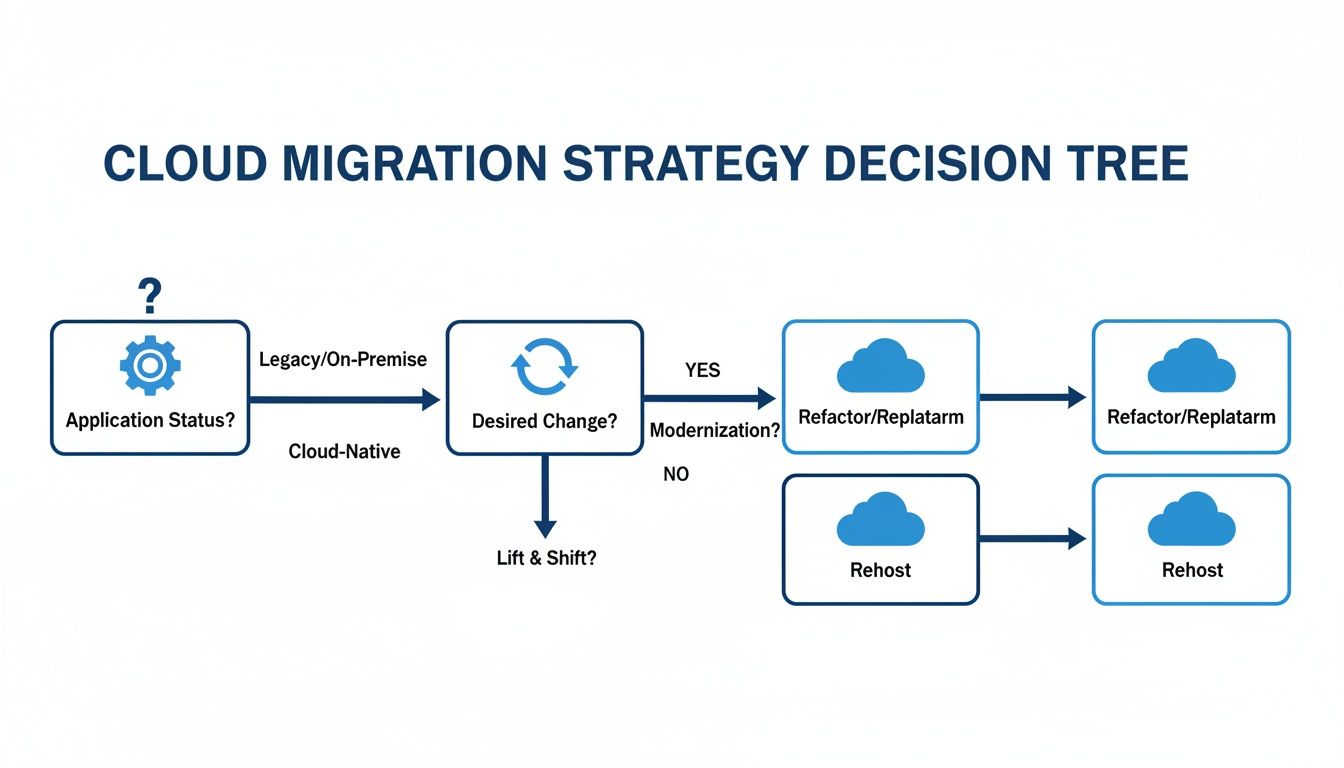
As you can see, the right path depends on whether an application needs modernisation to perform optimally in the cloud. Partnering with an expert who has navigated this process before is a logical first step toward building a roadmap that delivers tangible results.
Your migration should be a confident step towards a more agile and resilient future. A clear, well-executed plan ensures that your investment delivers long-term success, security, and scalability.
This kind of structured approach, often guided by expert IT consultation, removes guesswork from the process. It aligns technical execution with core business objectives, transforming what seems like an overwhelming project into a manageable, phased journey that steadily delivers value. The result is a future-ready organisation, prepared to innovate and adapt with confidence.
Your Cloud Migration Questions, Answered
Even when the benefits are clear, moving to the cloud is a significant decision. It’s natural to have practical questions about what the journey entails. To provide clarity, here are straightforward answers to some of the most common questions we hear from business leaders.
Is The Cloud Really More Secure Than My On-Premise Servers?
Yes, but with a critical caveat: it must be configured correctly. This is a common misconception. Major cloud providers like Microsoft Azure and Amazon Web Services (AWS) invest billions of pounds annually in physical and digital security—an investment no single business could match.
The key is knowing how to leverage this massive security infrastructure. When you combine their investment with a properly implemented Zero Trust security model and expert configuration, you achieve a cloud environment with superior threat detection, automated security patching, and simplified compliance management. It is not just a secure alternative; it's a strategic upgrade to your company’s defences.
How Long Does a Typical Cloud Migration Take?
There is no one-size-fits-all answer; the timeline depends on the complexity of your systems and the chosen migration strategy.
A few common scenarios can provide a general idea:
- A simple "lift-and-shift" (Rehost) of a few non-critical applications might take only a few weeks.
- A more involved project, such as refactoring core business applications to be fully cloud-native, could take several months to execute properly.
The most successful migrations are rarely a "big bang" event. We nearly always recommend a phased approach, starting with low-risk workloads. This builds momentum and lets your team get comfortable with the new environment before moving on to business-critical systems.
Will My Business Experience Downtime During The Migration?
With a well-executed plan, downtime should be minimal to non-existent. An experienced IT partner uses a toolkit of proven techniques to ensure the transition is seamless and does not disrupt your day-to-day operations.
Strategies like detailed planning, background data synchronisation, and rigorous testing in a staging environment are all conducted before the final switch. For your most critical systems, the final cutover is almost always scheduled during off-peak hours or over a weekend to completely avoid any impact on your team or customers.
What Are The Most Common Hidden Costs of Cloud Migration?
While the cloud offers excellent long-term savings, unexpected costs can arise without careful planning. Knowing what to look for is the first step in avoiding them.
Here are the common culprits for unexpected expenses:
- Data Egress Fees: These are charges for moving data out of the cloud. They can accumulate quickly if your applications regularly send large volumes of data to external systems.
- Poor Resource Management: The pay-as-you-go model is a double-edged sword. If cloud resources are not actively managed and "right-sized" to match actual demand, costs can spiral.
- Skills Gaps: A modern cloud environment requires a specific skillset to manage effectively. Without that in-house expertise, you may face inefficiencies or need to budget for additional training or external support.
A detailed Total Cost of Ownership (TCO) analysis, conducted with an experienced partner, is the best way to foresee these costs. It allows you to build them into your budget from day one, preventing financial surprises down the line.
Navigating your cloud migration successfully requires a clear strategy and deep technical expertise. At Zachsys Ltd, we provide the structured guidance and hands-on support to ensure your move to the cloud is smooth, secure, and delivers the business outcomes you expect. Start your journey with a free consultation today.