
Subtotal $0.00


Preventing a ransomware attack isn't about buying a single piece of software. It’s about building a layered defence that weaves together robust technology, defined processes, and educated people. This guide is about getting the fundamentals right—things like consistent patching and multi-factor authentication—while also building a bulletproof recovery plan, just in case. The objective is to ensure that if an attacker does get through, the damage is contained and your business can recover quickly.
Understanding the Modern Ransomware Threat

Let's be clear: ransomware is no longer just an IT headache. It's an existential business threat that can grind your operations to a halt, destroy critical data, and inflict lasting damage on your reputation. For UK businesses, the conversation has shifted from "if" an attack happens to "when," making a solid prevention and recovery strategy absolutely non-negotiable.
The days of attackers casting wide, obvious nets are over. Today’s methods are far more cunning and much harder to spot. They might disguise a malicious link in a phishing email that looks like a legitimate invoice from a supplier you work with every day. Or they might find a tiny, unpatched vulnerability in a third-party application your team relies on.
This threat is growing, especially for small and mid-sized businesses. The latest UK Cyber Security Breaches Survey highlighted a sharp rise in ransomware incidents hitting UK companies. This trend is particularly worrying as more businesses adopt cloud services while still managing older, legacy systems on-premise, creating a complex hybrid environment that can be difficult to secure.
The Three Pillars of Ransomware Defence
To get ahead of this threat, you need a strategy built on three core pillars. In our experience, neglecting any one of these leaves a gaping hole in your defences that attackers will happily exploit.
The Three Pillars of Ransomware Defence
| Pillar | Core Focus | Example Actions |
|---|---|---|
| People | Your employees are your first line of defence. An untrained user can inadvertently bypass the most advanced security tools with a single click. | Ongoing security awareness training, realistic phishing simulations, and clear policies for handling data and reporting incidents. |
| Process | Having clear, documented, and tested procedures for everything from patching and access control to incident response. | A formal patch management schedule, enforcing the principle of least privilege, and a battle-tested incident response plan. |
| Technology | The tools that protect your environment and enable recovery, such as next-generation firewalls, modern endpoint protection, and secure backups. | Next-Gen Antivirus (NGAV), Endpoint Detection and Response (EDR), and immutable, air-gapped backups. |
A truly resilient security posture is only achieved when these three pillars work in harmony. Technology provides the shield, Processes define the rules of engagement, and People are the vigilant operators making smart, secure decisions every day.
A truly resilient security posture is achieved when People, Process, and Technology work in harmony. Technology provides the shield, Processes define the rules of engagement, and People are the vigilant operators who make informed, secure decisions every day.
For many organisations, building this integrated defence starts with establishing a solid security baseline. A great first step is aligning with a government-backed scheme to understand what is Cyber Essentials certification and how it can provide a framework for your initial improvements. From there, it becomes a continuous cycle of assessing, hardening, and testing. It’s a journey that requires sustained effort, and where structured IT support often proves invaluable in building and maintaining systems that are both scalable and secure.
Building Your Human Firewall Through Security Training
Technology can build high walls and lock strong doors, but it only takes one person to carelessly open the gate. Your employees are arguably your most critical line of defence against ransomware, and attackers know this all too well. They relentlessly target your team with sophisticated tactics designed to exploit basic human nature—curiosity, a sense of urgency, and the simple desire to be helpful.
This is precisely why fostering a security-first culture is no longer a "nice-to-have"; it's a fundamental pillar of any credible ransomware prevention strategy. The goal isn't just to hammer home a list of rules. It's about empowering your people with the knowledge and critical thinking skills to recognise and stop an attack before it ever gets off the ground.
Beyond the Basic "Don't Click" Warnings
Simply telling staff "don't click suspicious links" is outdated advice that just doesn't cut it anymore. Modern social engineering goes far beyond a poorly worded email riddled with spelling mistakes. Today's attackers use highly personalised and convincing methods to build trust and manipulate their targets.
To truly prepare your team, security awareness training needs to be an ongoing, practical programme, not a one-off presentation you sit through once a year. This means getting out of the theoretical and into real-world application.
A few common but dangerously effective tactics your team must learn to spot include:
- Executive Impersonation: An email that looks like it's from a senior leader, often requesting an urgent fund transfer or sensitive data. This creates immense pressure to act quickly without thinking.
- False Urgency: Messages screaming that an account will be suspended, an invoice is overdue, or a delivery has failed. They're all designed to provoke a knee-jerk emotional response, bypassing rational thought.
- Supplier Compromise: This one is particularly tricky. Attackers take over a legitimate supplier's email account and send convincing—but malicious—messages from a source you already trust.
From Theory to Realistic Practice
The single most effective way to build this human firewall is through controlled, realistic phishing simulations. Let's be clear: this isn't about tricking or shaming employees. It's about providing a safe environment to experience what a simulated attack feels like, understand what went wrong, and learn from it without any real-world consequences.
When someone clicks on a simulated phishing link, it should immediately trigger context-specific micro-training that explains the red flags they missed. This simple approach transforms a potential mistake into a powerful, memorable learning moment.
The real objective of security training isn't to achieve a perfect score on a test. It's to build a resilient culture where every single employee feels comfortable and empowered to pause, question, and report anything that feels even slightly 'off'—without any fear of blame.
That blame-free environment is absolutely critical. You want your team to be your eyes and ears on the ground. If an employee fears being punished for reporting a potential mistake, they're more likely to hide it. That's how a minor incident quickly snowballs into a full-blown ransomware crisis. Make sure you have a clear, simple, and well-publicised protocol for reporting suspicious activity immediately.
The Proven Impact of Consistent Training
Investing in your people yields tangible, measurable security improvements. Phishing remains a dominant entry point for attackers, involved in a staggering 93% of UK cyber crimes. It’s the top ransomware vector globally at 41%, and here in the UK, 21% of ransomware attacks start with credentials stolen through social engineering.
The good news? Focused awareness programmes have been proven to significantly improve phishing identification rates, especially in small and mid-sized businesses where a single mistake can have a catastrophic impact. You can learn more about the latest ransomware statistics and their implications for your business here.
Ultimately, a well-trained team acts as a distributed detection system that technology alone can never replicate. Building this human firewall requires sustained effort, but it's a non-negotiable part of modern defence. This is often where the structured guidance and proven methodologies from an experienced IT partner can make all the difference, ensuring your training programme is a genuine pillar of your defence, not just a box-ticking exercise.
Layering Your Technical Defences for Maximum Protection
While a security-aware team is a massive asset, that "human firewall" must be backed by a robust, multi-layered technical defence. It’s like securing a castle; you wouldn't just rely on a high wall. You’d want a moat, reinforced gates, and vigilant guards too. In IT security, these layers are your overlapping technical controls, each one designed to stop an attacker at a different point in their assault.
A truly resilient defence goes way beyond basic antivirus and a simple firewall. It’s a deliberate, structured approach to managing vulnerabilities, controlling who gets access to what, and actively hunting for threats that might already be inside your network. This is your technical playbook for building that defence.
This diagram shows how you can build that human firewall, which is the perfect complement to your technical layers: train, simulate, and report.
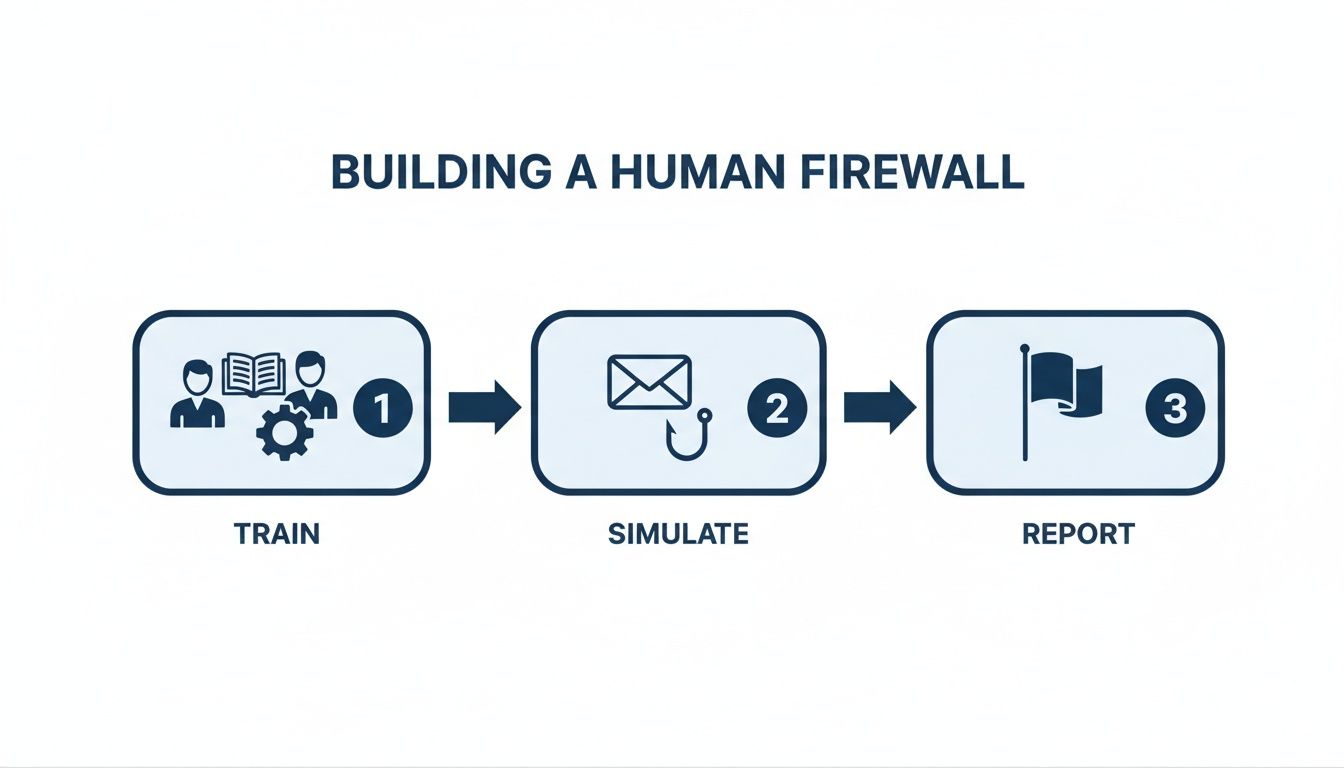
This process visualises how systematic training and testing create a culture of vigilance, reinforcing the technical measures we are about to discuss.
Close the Door with Aggressive Patch Management
One of the most common—and entirely preventable—ways attackers get in is by exploiting known vulnerabilities in software. When a vendor like Microsoft releases a security patch, they’re essentially handing you a new lock for a door that attackers have just learned how to pick. If you don't apply it, you’re leaving that door wide open.
Recent data paints a stark picture of the UK threat landscape. Ransomware attacks here predominantly exploit unpatched vulnerabilities (37%), followed by compromised credentials (21%) and malicious emails (18%). The fact that a 33% rise in attacks stemmed from unpatched flaws alone shows just how critical a solid patch management programme is. If you want to dive deeper into the data, you can explore more findings on ransomware trends here.
A documented, consistent, and prioritised patch management process isn’t just another IT task; it’s one of the most effective security controls you can implement. Delaying updates is an open invitation for an attack.
Building an effective process involves more than just flicking on automatic updates. It means having:
- An accurate inventory of all your hardware and software.
- A system for monitoring vendor security bulletins to know when new patches are out.
- A process for testing critical patches in a safe environment before rolling them out everywhere.
- A schedule for deploying patches promptly, prioritising the ones that fix critical or actively exploited flaws.
Secure Identities with Multi-Factor Authentication
If patching closes the known gaps in your software, then Multi-Factor Authentication (MFA) is the deadbolt on your digital front door. Stolen credentials are a goldmine for attackers, letting them bypass perimeter defences and just walk right in. MFA makes those stolen passwords almost useless by demanding a second form of verification.
But not all MFA is created equal. A simple text message code is better than nothing, but it's vulnerable to SIM-swapping attacks. A much more secure approach uses an authenticator app, a physical security key, or biometrics.
In a Microsoft environment, this is where Azure Active Directory (Azure AD) becomes a cornerstone of your defence. By using Conditional Access policies, you can get much smarter than a simple "on or off" approach to MFA. For example, you could set up policies that:
- Always require MFA for administrator accounts.
- Prompt for MFA when a user signs in from an unfamiliar location or a non-compliant device.
- Block sign-ins entirely from high-risk countries.
This intelligent, context-aware approach dramatically strengthens your identity security. If you're looking to understand the fundamentals better, our guide on what is Azure Active Directory provides a solid foundation.
Contain Breaches with Network Segmentation
Even with the best defences, you have to work on the assumption that a breach is possible. The next critical question is: if an attacker does get in, how far can they go? This is where network segmentation proves its worth. It’s simply the practice of dividing your network into smaller, isolated segments.
Think of your IT environment as a ship. If a hole gets punched in the hull, segmentation is like having sealed bulkheads that stop the entire ship from flooding. You contain the damage to one compartment.
In a real-world scenario, this means an attacker who compromises a user's laptop on the main corporate network can't automatically see and access your critical finance servers or your backups, because they sit on a different, firewalled segment. This simple act of containment is incredibly effective at stopping an attacker’s lateral movement—their ability to hop from system to system—and can be the difference between a minor incident and a full-blown ransomware catastrophe.
Go Beyond Antivirus with Endpoint Detection and Response
Traditional antivirus software is mostly signature-based. It’s pretty good at catching known viruses but often misses newer, more advanced threats that haven’t been seen before. And modern attackers are constantly changing their tools to evade these legacy systems.
This is why businesses are shifting to Endpoint Detection and Response (EDR) solutions. EDR tools, like Microsoft Defender for Endpoint, don't just look for known malware. They continuously monitor all your endpoints (laptops, servers, you name it) for suspicious behaviours.
For example, an EDR solution can spot when a common application like PowerShell suddenly starts trying to encrypt files or connect to a known malicious server. It sees these strange behaviours, alerts your security team in real-time, and can even automatically isolate the infected device from the network to stop the threat from spreading. This proactive, behaviour-based approach is essential for catching the sophisticated attacks that fly right past traditional antivirus.
Adopting a Zero Trust Security Model
The days of assuming everything inside your network is safe are long gone. That traditional "castle-and-moat" approach, where you build a strong perimeter but implicitly trust everything inside, is dangerously obsolete in an age of remote work and cloud services. The hard truth is that the perimeter is now everywhere, which demands a fundamental shift in how we think about security.
This shift is towards a Zero Trust security model. And no, it's not just another industry buzzword. Zero Trust is a practical, effective strategy built on a simple but powerful principle: never trust, always verify. It starts from the assumption that a breach is not only possible but likely. Every single access request is treated as if it comes from an untrusted network—it makes no difference whether it’s from inside or outside your walls.
This means we stop giving users broad, implicit trust just because they're on the company Wi-Fi. Instead, you verify who they are, you ensure their device is secure, and you grant them access only to the specific resources they absolutely need to do their job. Nothing more.
Making Zero Trust a Practical Reality
So how do you turn this philosophy into practice? Within a Microsoft ecosystem, it’s all about using the tools you likely already have. The focus moves away from just protecting the network perimeter to protecting your identity and data directly. It’s about building a modern defence that can stop an attacker with stolen credentials dead in their tracks, even if they’ve already slipped past your firewall.
A few core pillars bring a Zero Trust strategy to life:
- Verify Explicitly: Always authenticate and authorise based on all available data points. This isn’t just about a password; it includes user identity, location, device health, the service they're trying to access, and any known anomalies.
- Use Least Privilege Access: Grant the bare minimum access required. This means using Just-In-Time and Just-Enough-Access (JIT/JEA) policies, risk-based adaptive rules, and strong data protection to keep both your data and your people secure.
- Assume Breach: You have to work from the assumption that an attacker is already inside. This forces you to minimise the potential "blast radius" by segmenting access across your network, users, and apps. You also need to verify that all sessions are encrypted end-to-end.
For a deeper dive into the core concepts, our guide on what is Zero Trust security provides a comprehensive overview of this critical framework.
From Theory to Tangible Controls
Let's look at a real-world scenario. Imagine a finance team member’s credentials are stolen in a phishing attack. In a traditional model, that attacker might now have the keys to the kingdom, free to access everything that user can.
In a Zero Trust environment, the story is completely different.
The attacker tries to log in, but they're using an unrecognised device from a strange location. Azure AD Conditional Access policies immediately flag this as suspicious. A Multi-Factor Authentication (MFA) prompt is triggered, which the attacker can’t satisfy. Access is blocked, instantly. Even if they somehow found a way past that first hurdle, their access would be strictly confined to finance apps, preventing them from moving laterally to compromise domain controllers or backup systems.
A Zero Trust architecture fundamentally changes the game. It moves security from a static, location-based defence to a dynamic, identity-centric model that continuously evaluates trust at every access point.
Implementing this isn't a single project; it's a journey. It often starts with identity and endpoint management and then expands progressively. The structured guidance of an IT partner with deep expertise in the Microsoft security stack can be invaluable here. By designing and implementing these scalable, future-ready systems, you build a defence that is resilient by design, not by chance.
To make the difference crystal clear, let's compare the two approaches.
Traditional vs. Zero Trust Security Models
The table below highlights the key differences between the legacy "castle-and-moat" model and a modern Zero Trust framework. You can quickly see how the focus shifts from protecting a perimeter to protecting your data and identities, no matter where they are.
| Security Aspect | Traditional 'Castle-and-Moat' Approach | Modern Zero Trust Approach |
|---|---|---|
| Primary Defence | Strong network perimeter (firewalls). | Identity verification at every access point. |
| Trust Model | Implicitly trusts users and devices inside the network. | Explicitly verifies every user and device, assuming no trust. |
| Access Control | Broad access granted based on network location. | "Least Privilege" access; users only get what they need. |
| Breach Impact | High risk of lateral movement once the perimeter is breached. | Breaches are contained, limiting the "blast radius." |
Ultimately, adopting Zero Trust is one of the most significant steps you can take to prevent ransomware. It hardens your environment against the most common attack vectors and ensures that even if one layer of your defence fails, multiple others are ready to stop the threat from spreading.
Creating Your Ultimate Ransomware Recovery Plan

Let's be realistic. Even with the best defences in the world, you have to operate on the assumption that an attacker could still get through. This isn't about being pessimistic; it's about being prepared. Shifting your mindset from pure prevention to resilience is what separates a manageable disruption from a business-ending catastrophe.
A solid recovery plan isn't some dusty document you write once and forget about. It's a living, breathing combination of tested processes and protected assets designed to get you back online with minimal data loss and downtime. Think of it as your roadmap for surviving the absolute worst-case scenario.
The Cornerstone of Recovery: A Bulletproof Backup Strategy
When everything else fails, your backups are your last line of defence. If an attacker encrypts your live data, a clean, recent backup is often the only reliable way to restore everything without paying the ransom. The problem is, attackers know this. Hunting down and encrypting your backups is one of their first priorities.
This is exactly why a simple backup to a local server just doesn't cut it anymore. A truly resilient strategy starts with the classic 3-2-1 rule:
- Have at least three copies of your data.
- Store them on two different media types (like a local disk and cloud storage).
- Keep one copy held off-site and, crucially, offline.
That last point is the game-changer. You absolutely must have one backup copy that is completely isolated from your main network. This can be done through air-gapped backups (physically disconnected drives) or, more practically for most, immutable backups in the cloud. Immutable storage ensures a backup can't be altered or deleted for a set period, even by an admin account with compromised credentials.
Having a backup is only half the battle. Knowing for certain that you can restore from it is what truly matters. Untested backups are little more than a good intention.
Beyond Backups: The Critical Role of Recovery Testing
A backup strategy is purely theoretical until you put it to the test. We have seen too many organisations discover their backups were corrupted, incomplete, or painfully slow to restore after a disaster has already struck. This is an entirely avoidable failure.
Regular, documented recovery testing is non-negotiable. At a minimum, you should be doing a full test restore of critical systems to an isolated sandbox environment every quarter. This exercise does more than just validate the data; it reveals your true Recovery Time Objective (RTO)—how long it actually takes to get a vital service back up and running. More often than not, this process uncovers unexpected dependencies or configuration quirks that would have completely derailed a real recovery effort.
Developing Your Incident Response Plan
When an attack hits, panic and chaos are your worst enemies. A well-defined Incident Response (IR) plan is the playbook that replaces that confusion with clear, methodical action. Your IR plan doesn't need to be a hundred-page novel, but it must lay out the essentials to guide your team through the crisis.
Your plan absolutely must outline:
- Roles and Responsibilities: Who is on the response team? Who has the authority to make critical calls, like taking a system offline? Who is the single point of contact for communications?
- The Response Lifecycle: Detail the step-by-step process. This should cover initial detection and verification, containment (isolating infected systems), eradication (removing the threat), and finally, recovery.
- Communication Channels: How will the team communicate if primary systems like email or Teams are down? Set up secure, out-of-band communication methods before you need them.
This plan needs to be a living document. Review and update it regularly, and test it at least once a year with a tabletop exercise. Running a simulation lets your team walk through a realistic scenario, find the gaps in your plan, and build the muscle memory needed to respond effectively when the pressure is on. This is where structured IT support really proves its worth—transforming theoretical plans into proven, actionable recovery capabilities.
Your Ransomware Questions Answered
Even with the best playbook in hand, real-world questions always pop up when you start putting theory into practice. Based on the countless conversations we've had helping UK businesses strengthen their defences, here are the answers to the questions we hear most often from IT leaders and business owners.
Is Cyber Essentials Certification Enough to Stop Ransomware?
Think of Cyber Essentials (and its more advanced counterpart, Cyber Essentials Plus) as the foundational layer of your security. It’s a brilliant scheme that enforces crucial security hygiene – things like consistent patching and proper access control. Getting this right will absolutely fend off a huge volume of the common, automated attacks out there. It’s like making sure all your doors and windows are properly locked.
But it’s not a silver bullet against a determined, sophisticated attacker. True resilience is built on top of that foundation. You still need modern endpoint detection, a Zero Trust mindset to constantly verify access, and ongoing user training to handle the full spectrum of today's ransomware threats.
We’re Just a Small Business – Do We Really Need to Worry?
This is easily one of the most dangerous assumptions a business can make. Attackers don't see size; they see opportunity. In fact, many cybercriminal groups specifically target small and mid-sized businesses, assuming (often correctly) that they have fewer security resources and less mature defences. The automated tools they use scan the internet for vulnerabilities indiscriminately, without caring if they find a multinational corporation or a local accounting firm.
The harsh reality is that the impact of a successful attack is often far more devastating for an SME. Without the deep pockets of a large enterprise, a small business might not survive the crippling costs of downtime, recovery, and the hit to its reputation. If you hold valuable data, you are a target.
It's a critical mistake to think your business is "too small to be a target." Automated attack tools make every organisation with an online presence a potential victim, and SMEs are often viewed as easier prey.
How Often Should We Test Our Backups and Incident Response Plan?
Having a plan on a shelf is one thing; knowing it actually works under pressure is something else entirely. For your most critical systems, you should be testing your backup recovery process at least quarterly. And this doesn't mean just checking if a file is there. This needs to be a full restore to an isolated sandbox environment to verify the data is intact and confirm your recovery times are what you expect them to be.
Your Incident Response (IR) plan needs a proper workout at least annually through a tabletop exercise. This isn't a technical test, but a simulation that walks key people through a realistic breach scenario. It's the best way to uncover gaps in your process, potential communication breakdowns, or confusion over who's responsible for what before a real crisis hits.
Navigating the complexities of ransomware prevention is a continuous journey, not a one-off project. It requires a strategic, multi-layered approach that brings together the right technology, robust processes, and well-trained people. For long-term success, organizations often rely on strategic guidance to build and maintain the secure, scalable systems needed to stay ahead of evolving threats. This ensures your business is not just protected today, but resilient against the challenges of tomorrow.
ZachSys IT Solutions provides the expert guidance and structured IT support needed to design, implement, and manage secure and scalable systems, ensuring your business is resilient against the threats of tomorrow. Discover how we can help strengthen your security posture by booking a free consultation.