
Subtotal $0.00


When we discuss "remote work solutions," we're moving beyond simply providing a laptop and a VPN login. We are addressing the entire digital ecosystem—the integrated technologies, security frameworks, and operational policies that empower employees to be productive, collaborative, and secure from any location. This represents a fundamental shift from basic remote access to a comprehensive digital workplace designed for a distributed workforce.
Defining the Modern Remote Work Ecosystem
The transition to hybrid work is no longer a temporary adjustment but a core business strategy. With a significant portion of the workforce operating remotely, businesses require robust, scalable systems to maintain productivity and security. The challenge lies not in patching together isolated tools, but in architecting a unified environment that seamlessly combines secure access, intuitive collaboration, and proactive endpoint management.
While an essential VPN for remote workers is a common starting point, a truly resilient remote work strategy integrates multiple layers of technology and security. Successful organisations are building frameworks that guarantee not only protection but also scalability and a positive user experience. For small and mid-sized businesses, designing this digital workplace effectively is critical for competitiveness. To understand the foundational steps, our guide on how to modernise your workplace offers practical insights. Navigating these complex decisions often benefits from structured IT support to ensure the architecture aligns with long-term business goals.
Comparing Core Remote Access Architectures
Selecting the right remote access technology is a foundational decision that directly impacts your security posture, user experience, and IT operational workload. The two primary approaches, Virtual Desktop Infrastructure (VDI) and secure Virtual Private Networks (VPNs), solve different business problems and should not be treated as interchangeable.
A VPN extends the corporate network to a remote device, while VDI provides access to a fully controlled, centralised desktop environment hosted in a data centre or the cloud. The key distinction lies in where company data resides and how it is managed. This decision tree helps frame the strategic choice, which is often influenced by team size and operational complexity.
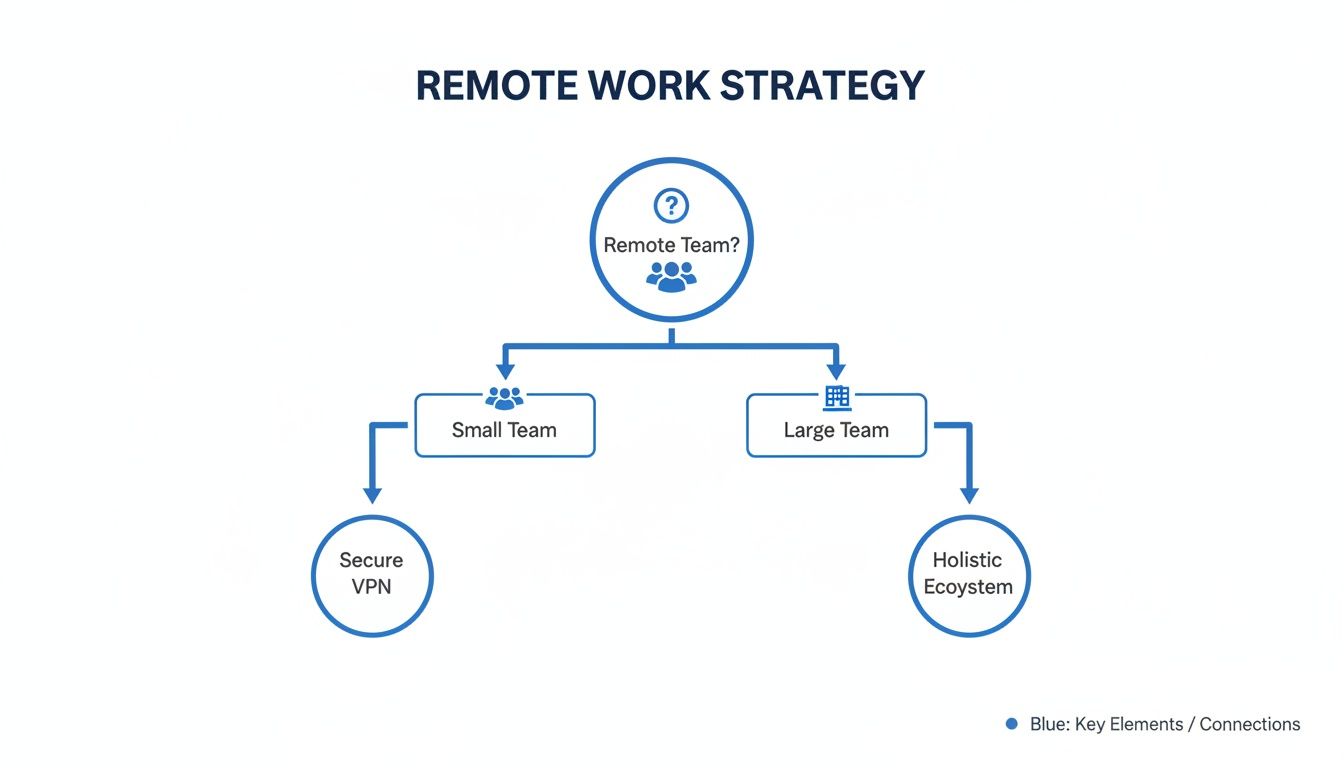
As illustrated, smaller teams may find a secure VPN sufficient. However, as an organisation scales or its operational complexity increases, a complete remote work ecosystem becomes the more strategic and sustainable solution. Deciding between these models is not merely a technical exercise; it's a strategic one that must align with specific security requirements, user roles, and business objectives.
| Remote Access Technology Comparison: VDI vs Secure VPN |
| :— | :— | :— |
| Decision Criterion | Virtual Desktop Infrastructure (VDI/AVD) | Secure VPN & Endpoint Access |
| Primary Use Case | High-security environments, regulated industries, consistent user experience on any device. | General remote access for trusted users and devices, connecting to specific corporate resources. |
| Data Location | Data and applications remain centralised in the data centre or cloud. Nothing is stored locally. | Data is accessed and can be stored on the local endpoint device, extending the network perimeter. |
| Security Posture | Very high. Centralised control minimises the risk of data leakage from lost or compromised endpoints. | Moderate to high. Security relies heavily on the endpoint's health, user behaviour, and robust policies. |
| User Experience | Consistent and managed. Users get the same desktop environment regardless of their personal hardware. | Varies depending on the endpoint device's performance and the quality of the network connection. |
| IT Management | Centralised patching, updates, and application management. More complex initial setup. | Decentralised. Requires strong endpoint management tools (MDM/UEM) to enforce policies. |
| Best For… | Finance, healthcare, legal, or any organisation with sensitive intellectual property. | Sales teams, marketing, and general business roles where flexibility is key and data risk is managed. |
Ultimately, VDI prioritises control, while a secure VPN offers flexible access. Neither is inherently superior; the optimal choice depends on aligning the technology with your business reality.
VDI for Centralised Control
For organisations in regulated sectors such as finance or healthcare, VDI is almost always the superior choice. Solutions like Azure Virtual Desktop (AVD) ensure that no corporate data resides on the end-user’s device. This centralisation simplifies compliance demonstration, dramatically strengthens security, and delivers a consistent user experience regardless of personal hardware.
Secure VPN for Flexible Access
Conversely, a modern secure VPN, combined with strict endpoint security policies, provides an agile and cost-effective solution for teams with a lower risk profile. This model places greater trust in the endpoint device but relies heavily on robust security software and clear policies to defend the network perimeter. The underlying network architecture is also crucial; a well-designed infrastructure prevents performance bottlenecks. You can learn more about SD-WAN benefits and its role in supporting remote work in our related guide.
Building a Secure Foundation with Zero Trust
Security remains the most significant challenge for a distributed workforce. The traditional "castle-and-moat" model, which trusted everything inside the network by default, is obsolete. With users and devices connecting from countless locations, the network perimeter has dissolved, demanding a more intelligent security approach.
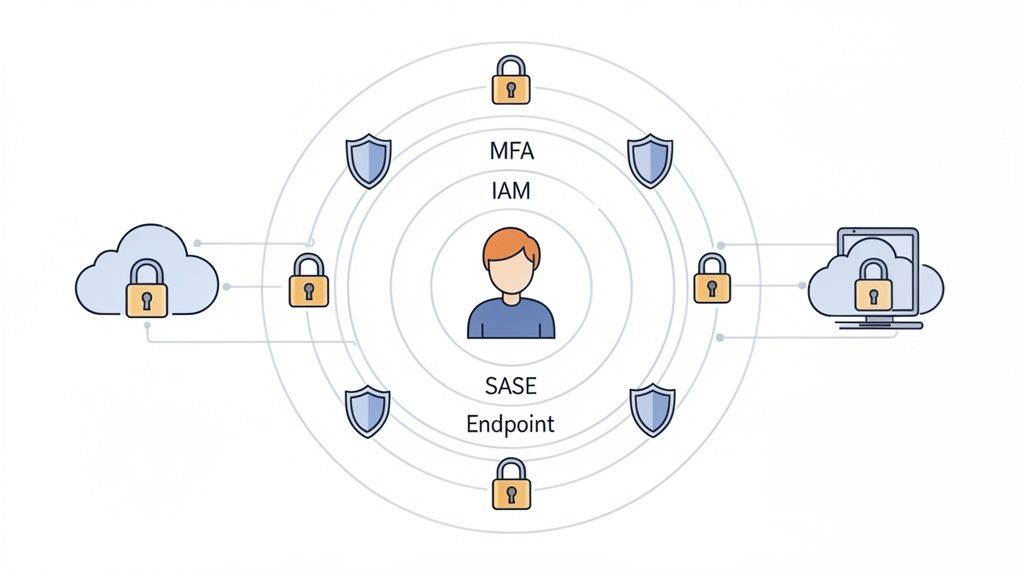
This is where the Zero Trust framework becomes essential. It operates on a simple yet powerful principle: never trust, always verify. Every access request is treated as a potential threat, regardless of its origin, and requires explicit authentication and authorisation before granting access to resources.
Core Components of Zero Trust
Implementing this framework is a strategic shift built on several interconnected technologies:
- Identity and Access Management (IAM): The foundation that ensures only authorised individuals access appropriate resources.
- Multi-Factor Authentication (MFA): A non-negotiable layer requiring two or more verification methods, drastically reducing the risk of credential theft.
- Endpoint Security: Robust policies and software that protect laptops, mobile devices, and other endpoints from malware and unauthorised access.
Cybersecurity is the Achilles' heel of many remote work implementations. With a high percentage of cyberattacks expected to target remote workers, the vulnerability for SMEs is particularly acute, making a comprehensive security assessment an urgent priority.
A Zero Trust architecture fundamentally redefines security from a location-centric to an identity-centric model. It assumes a breach is inevitable and builds defences to contain and minimise its impact.
Integrating these components under a Secure Access Service Edge (SASE) model creates a cohesive, cloud-native security solution. SASE merges networking and security into a single, managed platform that protects users consistently, no matter where they are. For a deeper exploration of this modern security philosophy, our guide on what Zero Trust security is provides further detail.
Enhancing Collaboration and Productivity
An effective remote work strategy is built on seamless collaboration, not just secure access. The goal is to create a digital workspace that not only replicates the physical office but enhances its collaborative spirit. Integrated platforms like Microsoft 365 often become the cornerstone of this approach.
Unifying the Digital Workspace
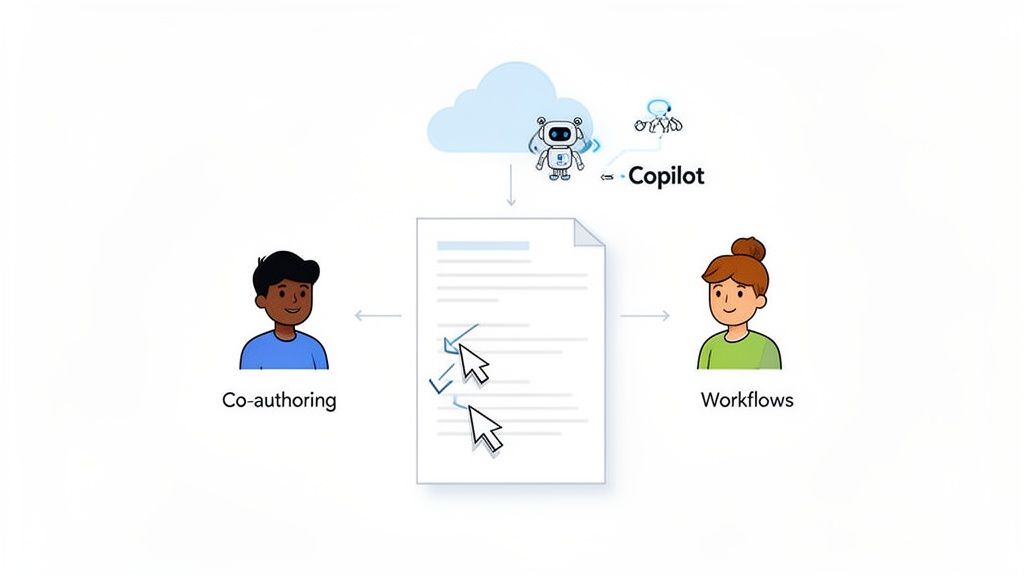
True productivity extends beyond basic chat and video calls. It stems from integrated tools for document co-authoring, project management, and automated workflows. For example, platforms like SharePoint and OneDrive centralise data, preventing the versioning chaos that often plagues distributed teams and ensuring everyone works from a single source of truth.
From direct experience, the most productive remote teams are those that master asynchronous collaboration. They rely on shared documents, clear project boards, and transparent communication channels to maintain momentum across different time zones.
The Rise of AI-Powered Productivity
The next evolution in remote collaboration is driven by AI. Tools like Microsoft Copilot can dramatically boost efficiency by assisting with content creation, summarising long conversations, and automating routine tasks. To thrive in a distributed environment, it is vital to implement the 9 best practices for remote teams. Successfully embedding these platforms and practices requires careful planning, which is why organisations often seek structured IT guidance to ensure technology genuinely fosters innovation and efficiency.
Managing Endpoints to Maintain Compliance
The concept of a secure network contained within office walls is outdated. With employees working from various locations on a mix of corporate and personal devices, the security perimeter must extend to every endpoint connecting to your systems. Robust endpoint management is not just a best practice; it is a critical component of any modern remote work strategy.
Tools like Microsoft Intune provide IT teams with both Mobile Device Management (MDM) and Mobile Application Management (MAM) capabilities. This allows for the enforcement of security policies, deployment of essential software, and the ability to remotely wipe corporate data from a lost or stolen device without affecting an employee's personal files.
Connecting Management to Governance
Effective endpoint management is inextricably linked to data governance. Using tools such as Microsoft Purview, businesses can classify and protect sensitive information regardless of where it is stored or who is accessing it. This creates a framework that ensures remote work practices comply with regulations like GDPR, fostering an environment that is both secure for the business and productive for its people.
With UK workers averaging 1.8 days a week remotely and 61% reporting higher productivity at home, the business case for investing in the right systems is clear. It is no surprise that 92% of executives plan to increase spending on hybrid work, with a focus on endpoint management and compliance. You can explore more data on the latest UK remote and hybrid work trends on itdeskuk.com.
Your Roadmap to a Resilient Remote Workplace
Achieving success with remote work is not a one-time project but an ongoing commitment to building a secure, productive, and adaptable digital workplace. It requires integrating the core pillars we’ve discussed into a cohesive system that supports your team and protects your business. A truly resilient framework depends on these essential components working in harmony.
The foundation is secure access, fortified by a Zero Trust security model that verifies every connection. This is paired with seamless collaboration tools that sustain productivity and innovation, regardless of location. Finally, robust endpoint management ensures every device connecting to your network is compliant and secure.
Designing, deploying, and managing a scalable remote work solution that integrates these elements requires specialist expertise. Partnering with experienced IT advisors provides the strategic guidance needed to build a future-ready system, ensuring your organisation thrives in a changing world.
Frequently Asked Questions
Businesses often have questions when implementing and managing remote work environments. Here are some of the most common inquiries.
What Is the First Step to Improving Remote Work Security?
The most critical first step is a shift in mindset toward a Zero Trust approach, beginning with a comprehensive security assessment to identify vulnerabilities. From there, the highest-impact action is to implement multi-factor authentication (MFA) across all applications. This single change provides a significant and immediate defence against common threats like credential theft.
How Do We Choose Between VDI and a Secure VPN?
The choice depends entirely on your business needs. If your organisation handles sensitive data, operates in a regulated industry, or requires consistent application performance, then a solution like Azure Virtual Desktop (AVD) is superior due to its centralised control. For smaller teams with basic access needs and robust endpoint security, a modern, secure VPN can be a cost-effective alternative.
It's notable that despite 91,000 monthly Google searches for 'UK remote jobs', only 5% of new job listings are fully remote. This gap highlights the competitive advantage businesses can gain by building effective remote work solutions to attract and retain talent. You can read more about the demand for remote roles at onrec.com.
Can Employees Use Personal Devices for Work Securely?
Yes, provided the right policies are in place. A Bring-Your-Own-Device (BYOD) strategy can be secured using Mobile Application Management (MAM) and Mobile Device Management (MDM) tools like Microsoft Intune. These tools create a secure container on personal devices for corporate data, allowing the business to manage its applications and information without accessing or controlling the employee's personal device.