
Subtotal $0.00


Preventing data loss is not a single action but a continuous strategy. It weaves together appropriate technology, clear policies, and ongoing team education to shield your most valuable asset from every angle—whether it's a sophisticated cyber attack, an accidental human error, or an unexpected system failure. At its core, it's about building resilience through robust backups, intelligent access controls, and a vigilant watch over your data to ensure it remains secure, compliant, and always recoverable.
The True Cost of Data Loss for Modern Businesses

Your company's data is its operational lifeblood. Every customer interaction, financial transaction, and strategic decision depends on its integrity and availability. When that data is compromised, the impact extends far beyond an IT headache; it strikes at the heart of your operational stability and financial health.
Too often, conversations about data loss get lost in technical jargon. The real discussion should be about business continuity. A single incident can halt operations, making it impossible to serve customers, process orders, or manage payroll. This immediate disruption is merely the opening act of a much larger challenge.
The Financial Fallout of an Incident
The direct financial costs of data loss can be staggering and often come from multiple directions simultaneously. These tangible expenses accumulate quickly, placing immense strain on an organisation's resources. Consider the immediate costs that arise:
- Operational Downtime: Every hour your systems are offline translates directly into lost revenue and diminished productivity.
- Recovery Costs: The expense of engaging specialist IT support, rebuilding systems from the ground up, and restoring data from backups can be substantial.
- Regulatory Fines: Non-compliance with regulations like the UK GDPR can result in severe financial penalties for significant data breaches.
This is not a theoretical threat for UK businesses. The government's Cyber Security Breaches Survey 2025 revealed that 43% of businesses experienced at least one cyber security breach in the last year. More alarmingly, the impact is intensifying, with 16% of these businesses suffering a direct negative outcome, such as financial loss or data loss. This trend underscores a critical reality: the temporary loss of access to essential files and networks is increasingly common, making proactive data protection an absolute necessity. You can explore the findings in the official 2025 government survey.
Beyond the Balance Sheet: The Intangible Costs
While the financial damage is significant, the intangible costs can be far more destructive in the long term. These consequences erode the foundation of your business and can take years to repair, if they can be repaired at all.
Data loss doesn't just delete files; it erodes trust. Once customers question your ability to protect their information, regaining their confidence is an uphill battle that many businesses do not win.
This loss of trust is perhaps the most damaging outcome. A tarnished reputation can lead to customer churn, create challenges in attracting new clients, and negatively impact brand perception, affecting everything from strategic partnerships to investor relations. The competitive advantage you have worked tirelessly to build can vanish overnight due to a single security oversight.
Ultimately, preventing data loss is not just an IT function—it is a core business imperative. It is about preserving your operational capability, protecting your financial stability, and safeguarding the hard-won trust of your customers. Understanding these real-world stakes is the first and most critical step toward building a truly resilient organisation.
Understanding the Root Causes of Data Loss
To build an effective defence against data loss, you must first understand the threats you face. While it is easy to focus on sophisticated cyber attacks, the reality is often far more mundane and originates closer to home. Truly preventing data loss requires recognising that threats can emerge from anywhere—a simple mistake, a failing hard drive, or even a malicious insider.
A multi-layered prevention strategy is essential because no single defence can counter every type of threat. Each root cause demands a distinct approach, from technical controls to staff training, highlighting the need for a comprehensive and well-rounded security posture.
The Human Element
More often than not, data loss begins with an unintentional human error. A well-meaning employee might accidentally delete a critical shared folder, overwrite an important document without a backup, or send an email containing sensitive information to the wrong recipient. These are not malicious acts, but their impact can be just as severe as a targeted cyber attack.
This is the most common—and perhaps most challenging—cause to manage, as it is woven into daily operations. Without the right safeguards and clear processes, a single click can lead to significant disruption. This underscores the importance of user training and system-level controls that serve as a safety net for your team.
The greatest vulnerability in any security system is often the human one. This is not about assigning blame; it is about acknowledging that mistakes will happen and building systems resilient enough to withstand them.
System and Hardware Failures
Despite its advancements, technology is not infallible. Hardware can and will fail, often without warning. A server's hard drive could crash, a power surge might damage critical infrastructure, or a software bug could corrupt an entire database. These failures are typically abrupt and can bring operations to a grinding halt if data is not adequately backed up.
These incidents serve as a stark reminder that both physical and digital infrastructure have a finite lifespan. Proactive monitoring, regular maintenance, and a robust backup and recovery plan are non-negotiable for preventing data loss from this inevitable threat.
Malicious Threats: Internal and External
While less frequent than human error, malicious threats carry the potential for the greatest damage. They generally fall into two categories, each requiring a unique defensive strategy.
-
External Cyber Attacks: This is what most people envision when they hear "data breach." These threats include ransomware, which encrypts your files and demands a ransom, and phishing attacks, which deceive employees into revealing their login credentials. These attacks are designed to infiltrate your network from the outside to steal or destroy data.
-
Insider Threats: This is a more insidious risk involving a current or former employee intentionally stealing or deleting company data. Because these individuals have legitimate access, detecting such activity can be incredibly difficult, which is why robust identity and access management is so critical. A foundational understanding of how tools like what Azure Active Airectory is can help secure access.
Effectively preventing data loss means addressing all these root causes head-on. By acknowledging the risks posed by accidents, system failures, and deliberate attacks, you can begin to build a resilient strategy that protects your organisation's most valuable asset from every angle. It is this type of structured approach that experienced IT partners help implement to ensure no vulnerability is overlooked.
Building a Multi-Layered Data Protection Strategy
When it comes to protecting your data, there is no single solution. The most resilient businesses we work with do not rely on a single tool or tactic; they construct a defence-in-depth system where each layer reinforces the others. A reactive approach is a recipe for disaster. The only viable path forward is a proactive, well-structured strategy.
The most successful frameworks are built on four essential pillars: People, Policies, Processes, and Technology. This model shifts an organisation from a state of constant crisis management to one of controlled, predictable security. It is about creating a solid foundation for preventing data loss before it occurs.
This flowchart illustrates the common pathways to data loss, highlighting why a robust strategy must account for human error and system failures, not just external malicious attacks.
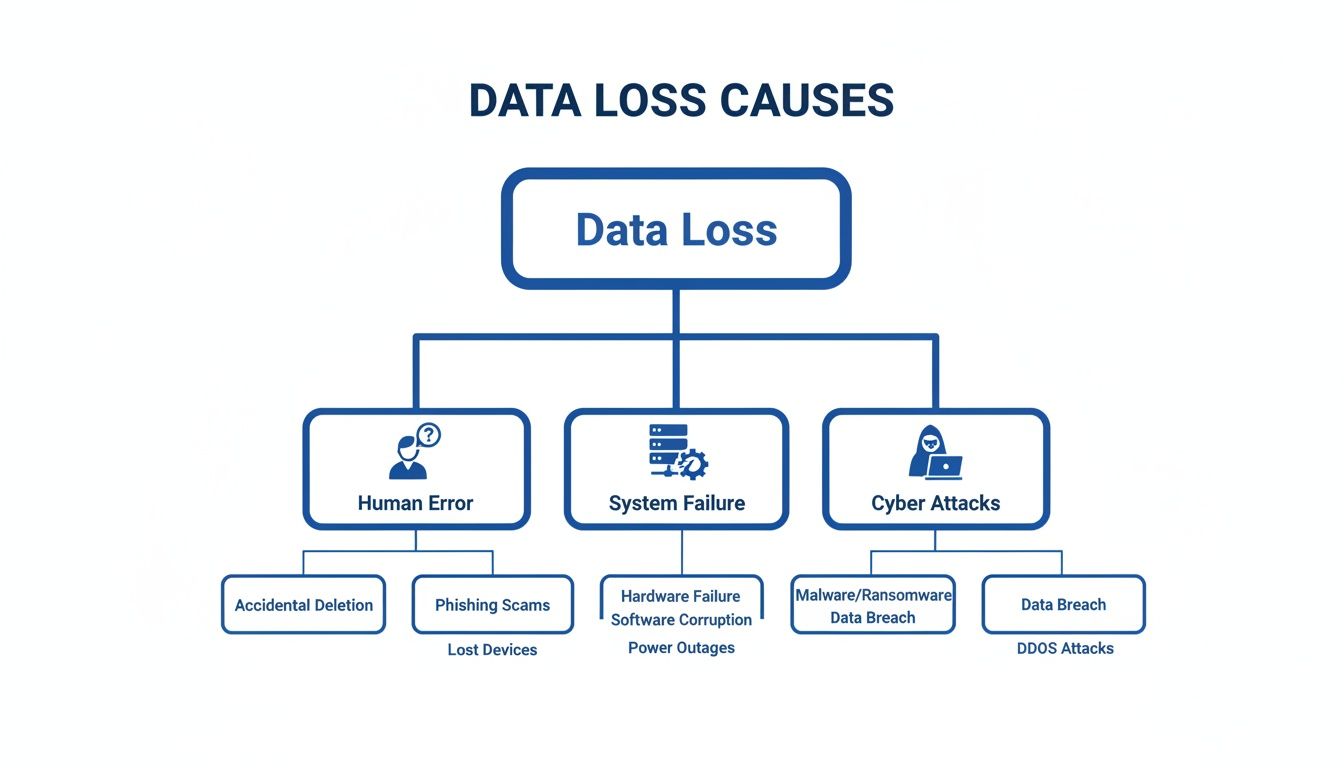
As you can see, the threats are varied. Relying on just one type of defence leaves you exposed.
Let's break down how these pillars work in concert to create a truly comprehensive defence.
| The Four Pillars of Data Loss Prevention |
|---|
| This table summarises the key components and actions for each layer of a comprehensive data loss prevention strategy. |
| Pillar |
| People |
| Policies |
| Processes |
| Technology |
| Core Focus | Key Actions |
|---|---|
| Turning employees from a potential vulnerability into the first line of defence. | – Security awareness training – Phishing simulations – Clear communication on data handling best practices. |
| Establishing the official rules and guidelines for data protection. | – Develop Acceptable Use Policy – Create a Data Classification scheme – Define Access Control rules. |
| Defining the repeatable actions and workflows that put policies into practice. | – Create and test an Incident Response Plan – Implement regular backup and recovery drills – Formalise change management. |
| Implementing the tools and systems that enforce policies and automate processes. | – Deploy backup and disaster recovery solutions – Implement Data Loss Prevention (DLP) tools – Enforce encryption and access controls. |
By weaving these four elements together, you build a much stronger, more resilient security posture.
The Human Layer: Your First Line of Defence
No matter how advanced your technology, it cannot do everything. Your employees interact with company data continuously, making them either your greatest security asset or your biggest weakness. This is the 'People' pillar.
When you empower your team with ongoing security awareness training, you transform them from a potential risk into an active line of defence. An employee who can identify a phishing email, understands the importance of strong passwords, and knows how to handle sensitive information is actively reducing your attack surface.
A well-trained team becomes a human firewall. Investing in their security knowledge provides a return that no software alone can match, turning passive users into proactive defenders of your data.
Establishing Clear Rules with Policies
The second pillar, 'Policies', is about creating the official rulebook for how your organisation protects its information. Without clear, documented policies, data handling becomes a matter of guesswork, opening the door to mistakes and inconsistencies.
These policies do not need to be overly complex, but they must be clear and accessible. They should cover key areas such as:
- Acceptable Use: What staff can and cannot do with company devices and data.
- Data Classification: Defining data as sensitive, confidential, or public, and specifying how each level must be handled.
- Access Control: Outlining who can access what data and under which conditions.
These documents establish a consistent standard for everyone, ensuring they understand their role in maintaining data security.
Preparing for the Unexpected with Processes
Well-defined 'Processes' are your third pillar. These are the practical, repeatable actions your organisation takes to manage and protect data, transforming your policies into practice.
A prime example is an Incident Response Plan. What happens when a breach is suspected? Who is notified? What are the immediate steps to contain the damage? Having this documented before a crisis enables a swift and effective response instead of a panicked one. This is particularly important in the UK, where regulators expect to see evidence of proactive measures. The ICO's own data reveals a constant stream of incidents involving personal data loss—many of which could have been minimised with a properly tested backup and restore process. You can learn more about UK data security incident trends on the ICO website.
The Technology That Underpins It All
Finally, 'Technology' is the fourth pillar that supports and automates the first three. This includes the hardware and software that enforce your policies and enable your processes to run smoothly. From firewalls and antivirus solutions to advanced backup systems and encryption, the right technology acts as a powerful force multiplier for all your security efforts.
Modern security is shifting toward a "never trust, always verify" mindset, known as Zero Trust. This approach assumes threats can originate from anywhere, both inside and outside the network. You can explore this concept further in our guide to Microsoft Zero Trust implementation, which explains how to build security that is not reliant on outdated network perimeters.
Bringing these four pillars together creates a robust, interlocking defence. It is this methodical approach that expert IT partners help organisations build, ensuring their strategy for preventing data loss is both complete and resilient.
Essential Technologies for Protecting Your Data
Once you have a solid strategy built on people, policies, and processes, it is time to implement the technology. These are the powerful tools that bring your data protection plan to life, working tirelessly in the background to automate security and provide the visibility needed to keep your information safe.
Let's demystify some of the most critical technologies available. We will examine what they do, why they are important, and how they function in a real-world business environment.
Backups and Disaster Recovery
At its core, a backup is a copy of your data stored separately from the original. It is the ultimate safety net. If a file is accidentally deleted, a server fails, or a ransomware attack encrypts your systems, your backups are what allow you to restore operations and avert a catastrophe.
Disaster Recovery (DR) is the broader plan that utilises those backups to get your business back on its feet after a major incident. It answers the critical questions: How quickly can we recover? And to what point in time can we restore our data?
A backup you haven't tested is just a hope, not a strategy. The true value of a backup is only realised when you can successfully restore from it, making regular, documented testing an absolute necessity.
To ensure a backup strategy is truly robust, many organisations follow the classic 3-2-1 rule:
- Maintain three copies of your data (the live version and two backups).
- On two different types of media (e.g., local disk and cloud storage).
- With one copy stored off-site (physically separate from your primary location).
In a modern cloud environment, this could mean having live data in Microsoft 365, one backup in an Azure data centre, and a second, geo-redundant copy in another region entirely.
Data Loss Prevention Tools
While backups help you recover data after it has been lost, Data Loss Prevention (DLP) tools are designed to stop the loss from happening in the first place. A robust DLP solution acts as a security guard for your information, continuously identifying, monitoring, and blocking the unauthorised movement of sensitive data.
Imagine an employee is about to inadvertently email a spreadsheet containing customer financial details to an external address. A DLP policy can automatically detect this sensitive information and intervene.
This intervention could be:
- Blocking the email entirely.
- Displaying a warning to the user with a pop-up explaining the policy violation.
- Encrypting the attachment automatically before it is sent.
Tools like Microsoft Purview are prime examples of modern DLP in action. They scan documents, emails, and chat messages in real time across Microsoft 365 services, identifying sensitive information from credit card numbers to national insurance numbers. It is an automated method for enforcing your data handling policies and dramatically reducing the risk of accidental data leaks. Expert guidance is often key to configuring these systems correctly; learn how to get started with Microsoft Purview to understand its full capabilities.
Encryption Everywhere
Encryption is the process of scrambling data into an unreadable format, making it useless to anyone without the correct key to decrypt it. It is one of the most powerful controls for preventing data loss, especially when a device is lost or stolen.
Consider this: if a company laptop is stolen, unencrypted files are an open book. However, if the hard drive is encrypted, it becomes a locked safe—the thief may have the device, but the contents remain secure.
For encryption to be truly effective, it must be applied in three states:
- Data at Rest: Information stored on hard drives, servers, or in the cloud.
- Data in Transit: Information moving across a network, such as an email being sent.
- Data in Use: A more advanced form of protection for data while it is being processed in system memory.
Identity, Access Management, and Zero Trust
Finally, you must control who can access your data. This is the domain of Identity and Access Management (IAM). Systems like Azure Active Directory (now Microsoft Entra ID) manage user identities and enforce access rules, ensuring that individuals can only access the data they are explicitly authorised to use.
This is a cornerstone of the Zero Trust security model, which operates on a simple but powerful principle: never trust, always verify. It assumes that threats could exist both inside and outside your network, so it demands strict verification from every user and device attempting to access any resource.
Implementing a Zero Trust mindset means that even if a cybercriminal steals an employee's password, they still cannot access sensitive data without passing additional checks, such as multi-factor authentication. This approach dramatically strengthens your defences by shifting from a brittle perimeter-based security model to a flexible, identity-focused one.
Implementing Data Protection with Microsoft 365 and Azure

Understanding the theory of data protection is important, but practical implementation is what truly matters. For most modern businesses, the necessary tools are not an additional purchase; they are already integrated within the Microsoft 365 and Azure subscriptions you use daily. This is where strategy becomes reality.
This is not a technical manual but a guide to making confident first moves. By activating and correctly configuring the powerful security features within your Microsoft ecosystem, you can build a formidable defence against data loss without a significant upfront investment. The key is knowing which levers to pull first.
Fortifying Your First Line of Defence with Azure AD
Your first and most impactful action should be to secure your user identities. Stolen login credentials are the primary vector for attackers, making robust authentication an absolute necessity.
This is where Azure Active Directory (Azure AD)—now part of Microsoft Entra—serves as your command centre. The single most effective step you can take immediately is to enable Multi-Factor Authentication (MFA) for all users. The concept is simple: anyone logging in must provide their password and a second form of verification, such as a code from a mobile app.
The effect is immediate. Even if a cybercriminal obtains a password, they are stopped without that second factor. Implementing MFA has been shown to block over 99.9% of account compromise attacks, fundamentally transforming your security posture with a single setting.
Think of MFA as the digital equivalent of needing both a key and a security code to enter a building. A stolen key on its own becomes almost useless.
Preventing Accidental Leaks with Microsoft Purview
Once identities are secured, your next priority is to manage the data itself. A significant amount of data loss stems from simple accidents, such as an employee emailing a sensitive file to the wrong person. This common error can be prevented with Data Loss Prevention (DLP) policies.
Microsoft Purview includes built-in DLP tools that act as an intelligent gatekeeper for your information. You can establish foundational policies to automatically identify and protect sensitive data across your entire Microsoft 365 environment.
A great first step is to create a policy that prevents financial or personal data from being shared externally. For instance, you could set a rule that scans all outgoing Outlook emails for information such as:
- UK National Insurance numbers
- Credit card details
- Financial data like IBAN or SWIFT codes
If the policy detects this information, you can configure it to either block the email entirely or display a warning to the user, giving them a chance to reconsider. This turns a common human error into a teachable moment, reinforcing your data policies in real time.
Securing Collaboration in SharePoint and OneDrive
Your teams rely heavily on tools like SharePoint and OneDrive. While they are excellent for productivity, they can also become sources of data leakage if not managed properly. Securing these platforms is a critical component of preventing data loss.
Begin by reviewing and tightening your external sharing settings. You can configure SharePoint to permit sharing only with individuals from specific, approved domains, or completely disable anonymous "anyone with the link" access for sites containing sensitive project files. This ensures that even if someone attempts to share a file too widely, the system's guardrails will prevent it.
You can also use sensitivity labels from Microsoft Purview to classify documents directly within SharePoint. A document labelled "Confidential," for example, can have policies automatically applied that encrypt it and block it from being downloaded to a personal, unmanaged device. This intelligent integration is what makes the Microsoft ecosystem so effective when configured with expertise.
Safeguarding Critical Data with Azure Backup
Finally, no data protection plan is complete without a rock-solid backup solution. For your critical servers and applications, whether on-premises or in the cloud, Azure Backup offers a robust and deeply integrated solution.
Azure Backup allows you to create automated, secure backups of your business-critical data, storing them safely within Microsoft’s resilient cloud infrastructure. It helps you adhere to the classic 3-2-1 rule by maintaining multiple copies of your data in different locations.
Setting up your first backup policy is straightforward. You define what needs to be backed up, the frequency of backups, and the retention period. This ensures that in the event of a server failure, ransomware attack, or accidental deletion, you have a clean copy of your data ready for restoration. It is the kind of foundational IT support that ensures business continuity, no matter the circumstances.
Your Roadmap to a Resilient Data Strategy
Preventing data loss effectively is not a one-time project; it is an ongoing commitment to building resilience into the fabric of your business. Integrating the right policies, people, and technology requires a structured, logical plan. This roadmap outlines a progression from essential first steps to a mature, proactive security posture.
A successful journey can be broken down into three distinct phases. Following them in order ensures you build capabilities methodically, without becoming overwhelmed.
A Phased Approach to Data Resilience
-
Assess and Identify: You cannot protect what you do not understand. The first step is to gain clarity. Identify your most critical data, determine where it resides, and pinpoint the greatest risks to its security. This initial assessment is vital—it provides the context needed to prioritise your efforts and allocate resources where they will have the most significant impact.
-
Implement and Control: Once you have a clear understanding of your risks, it is time to implement foundational controls. This means deploying non-negotiable security measures like regular, tested backups and enabling Multi-Factor Authentication (MFA) across all accounts. These actions provide the greatest immediate security improvement, significantly reducing your attack surface.
-
Mature and Adapt: With the fundamentals in place, you can begin to mature your defences. This is where you introduce more advanced strategies like a Zero Trust architecture, which continuously verifies every access request, and begin fine-tuning your Data Loss Prevention (DLP) policies. This final phase is about fostering a dynamic, forward-looking security culture that can adapt to new threats as they emerge.
Proactive data protection is the bedrock of modern business resilience. It's an ongoing journey that enables long-term growth and stability, a process often made smoother and more effective with experienced IT guidance to ensure every step is confident and secure.
Frequently Asked Questions About Preventing Data Loss
Diving into data protection can raise many practical questions. Here are straightforward answers to some of the most common queries we hear from businesses working to build a robust data loss prevention strategy.
What Is the Most Important First Step?
If you do only one thing, implement Multi-Factor Authentication (MFA) across every user account.
While a comprehensive strategy is the ultimate goal, securing your identities provides the single biggest and fastest security win, blocking over 99% of account compromise attacks. It acts as the ultimate gatekeeper; even if a cybercriminal obtains a password, they cannot gain access.
Once MFA is enabled, your next priority should be establishing a robust backup and recovery plan that you test regularly. This is your final line of defence against everything from a simple mistake to a full-blown ransomware attack.
An untested backup isn't a strategy; it's a gamble. The only way you know for sure that your data is safe is by proving you can get it back when it counts.
How Often Should We Test Our Backups?
For most businesses, conducting a full disaster recovery test at least once or twice a year is a good rule of thumb. In addition, you should perform smaller, more frequent restoration tests for your most critical systems—quarterly or even monthly for key files or databases.
The goal is to build operational muscle memory. These tests are not just about verifying that the technology works; they are about ensuring your team knows exactly what to do under pressure.
Can We Rely Solely on Cloud Provider Security?
This is a common misconception. While major cloud providers like Microsoft offer exceptional security for their infrastructure (protecting data centres from fires, floods, and network outages), you remain responsible for securing your own data within their cloud. This is known as the Shared Responsibility Model.
In practice, this means it is your responsibility to:
- Configure access controls correctly.
- Protect all user accounts with strong authentication.
- Set up and manage backups for your data.
- Implement Data Loss Prevention (DLP) policies to prevent sensitive information from being exfiltrated.
Relying solely on the provider leaves significant security gaps that attackers are eager to exploit. It is your responsibility to close these gaps, and a structured IT support framework is essential for managing this effectively.
Building a resilient strategy for preventing data loss takes careful planning and skilled execution. At ZachSys IT Solutions, we bring the strategic guidance and technical know-how to help you build a secure, future-ready IT environment.
To discuss your data protection needs, book a complimentary consultation at https://zachsys.com.