
Subtotal $0.00


The core difference between on-premises and cloud infrastructure boils down to two things: ownership and location.
With on-premises, you own, operate, and maintain all your IT hardware within your own physical space. This gives you direct, hands-on control. With the cloud, you're essentially renting resources from a third-party provider over the internet, trading direct control for flexibility and scalability. This choice is no longer just a technical detail; it's a foundational business decision.
Choosing Your IT Foundation: On-Premises vs Cloud Explained

Deciding between on-premises infrastructure and the cloud is one of the most significant strategic calls a business can make. It goes far beyond a simple technical choice; it fundamentally shapes your financial model, security posture, and ability to pivot in a changing market. The decision determines whether you sink capital into physical assets (Capital Expenditure) or adopt a more fluid, subscription-based model (Operational Expenditure).
The on-premises vs cloud debate has intensified as technology has evolved. The UK cloud market, now valued at $56.08 billion and projected to more than double, is a testament to this massive shift in how IT budgets are spent.
With a staggering 96% of UK organisations now using some form of cloud service, it’s clear where the momentum lies. But that doesn’t automatically make it the right choice for every workload or every business. The real challenge is understanding why this shift is happening and how to apply it correctly to your own operations.
This guide is designed to be your roadmap, helping you evaluate which model truly aligns with your specific business goals. We'll cut through the marketing noise to focus on the criteria that matter in real-world IT environments:
- Financial Impact: How does each model affect your budget, both now and over the long term?
- Security and Control: Who is responsible for protecting your data and meeting compliance standards?
- Performance and Reliability: Which option delivers the consistent speed and uptime your operations depend on?
- Scalability and Agility: How quickly can your infrastructure adapt when your business grows—or shrinks?
While understanding the benefits of cloud migration provides essential context, the first step is always a straightforward, honest comparison of the fundamentals.
| Attribute | On-Premises | Cloud Computing |
|---|---|---|
| Primary Cost Model | Capital Expenditure (CapEx) | Operational Expenditure (OpEx) |
| Location | Housed within your organisation's physical facilities | Hosted in a third-party provider's data centres |
| Control Level | Complete, direct control over all hardware and software | Shared control, managed by the provider |
| Scalability | Manual, requires purchasing and installing new hardware | On-demand, resources are scaled up or down instantly |
A Practical Comparison of Core Infrastructure Attributes
Moving beyond basic definitions, the real on-premises vs cloud debate boils down to how each model impacts your day-to-day operations. This isn't just a technical exercise; it's a strategic decision that shapes your budget, security posture, and ability to adapt to market changes. Let's break down the core attributes side-by-side to see what they mean in practice.
Cost Structure: The CapEx vs OpEx Divide
The most immediate difference is how you pay. On-premises infrastructure is a Capital Expenditure (CapEx) model. You make a significant upfront investment in servers, storage, and networking hardware, which then depreciates over time. This offers predictable costs once everything is paid for, but that's only part of the story.
The total cost of ownership (TCO) for on-prem equipment goes far beyond the initial purchase price. You must account for the often-overlooked expenses:
- Power and Cooling: Data centres are power-hungry, a cost that only grows as you add hardware.
- Physical Security: Securing your server room with access controls, CCTV, and environmental monitoring is a constant operational drain.
- Maintenance and Support: Hardware will fail. You need support contracts, spare parts, and skilled staff on hand to manage upkeep.
Cloud infrastructure flips this on its head, operating on an Operational Expenditure (OpEx) model. You pay a recurring fee for the resources you use, eliminating the massive initial outlay. This pay-as-you-go approach provides financial flexibility, allowing smaller businesses to access enterprise-grade technology without the hefty price tag. You're converting a large, fixed cost into a variable one that scales with your business.
Security and Compliance: A Shared Responsibility
A common myth is that one model is inherently more secure than the other. In reality, security depends entirely on implementation and expertise, not location.
With on-premises, you have absolute control over your physical hardware and data. You are solely responsible for every layer of security—from the lock on the server room door to firewall rules and endpoint protection. This offers maximum control, which is non-negotiable for organisations with strict data sovereignty rules or certain government and financial regulations.
Cloud security operates on a shared responsibility model. The cloud provider (like AWS or Azure) is responsible for the security of the cloud—protecting their physical data centres and core infrastructure. You, as the customer, are responsible for security in the cloud. This means correctly configuring your network, managing user access, encrypting data, and securing your applications.
The real question isn't "Which is more secure?" It's "Who is better equipped to manage security?" Cloud providers invest billions in security expertise and infrastructure, offering a level of protection that most individual businesses simply can't afford to replicate on their own.
A good way to visualise these differences is with a quick comparison.
On-Premises vs Cloud At-a-Glance Comparison
Here is a summary table that contrasts the key differences between on-premises and cloud models across the most critical business and technical criteria.
| Evaluation Criteria | On-Premises Infrastructure | Cloud Infrastructure (IaaS/PaaS/SaaS) |
|---|---|---|
| Cost Model | CapEx: High upfront investment in hardware, plus ongoing operational costs. | OpEx: Pay-as-you-go subscription model with minimal to no upfront cost. |
| Security Responsibility | Total Control: You are solely responsible for all security layers, physical and digital. | Shared Responsibility: Provider secures the cloud; you secure your data in the cloud. |
| Performance | Ultra-Low Latency: Excellent for localised, high-speed applications. | Global Reach: High performance across distributed regions, backed by powerful networks. |
| Management Overhead | High: Requires a dedicated, skilled IT team for maintenance, updates, and support. | Low: Provider manages the underlying infrastructure, freeing up your internal team. |
| Scalability | Limited & Slow: Scaling requires a lengthy hardware procurement and setup process. | Elastic & Instant: Scale resources up or down on-demand within minutes. |
| Reliability & Uptime | Dependent on your design and investment in redundancy. | High by default, often with financially-backed SLAs guaranteeing 99.9%+ uptime. |
This table provides a high-level overview, but the best choice always depends on your specific business needs and constraints.
Performance and Latency: Proximity vs Global Reach
For on-premises environments, performance is all about proximity. With servers on your local network, you get ultra-low latency, which is essential for applications needing instant response times. Think high-frequency trading, manufacturing process control, or large-file video editing where every millisecond counts. However, performance is capped by the hardware you’ve purchased and the quality of your internal network.
Cloud providers offer a different approach built on massive, globally distributed data centres. While there's always some latency when data travels over the internet, major players mitigate this with Content Delivery Networks (CDNs) and regional data centres. For businesses needing to optimise connectivity between sites, understanding modern networking is crucial. You can learn more about how technologies like SD-WAN improve application performance across distributed environments. The cloud's real performance advantage lies in its immense resource pool and high-availability architecture, often backed by a Service Level Agreement (SLA) guaranteeing uptime of 99.9% or more.
Management and Expertise: The People Factor
Running an on-premises data centre demands a dedicated, skilled IT team. You need experts in networking, server administration, databases, and cybersecurity to handle everything from hardware installation and patching to troubleshooting outages and planning for future capacity. This gives you direct oversight, but it also makes recruitment, training, and retention a significant operational challenge and cost.
In a cloud model, the provider manages all the underlying infrastructure, freeing your IT team from the day-to-day grind of hardware maintenance. This allows your talent to shift focus to more strategic, value-adding activities like application development and process optimisation. Instead of managing servers, their expertise turns to cloud architecture, cost management, and automation—a key driver for businesses looking to do more with their existing team.
Scalability and Agility: Responding to Change
Scalability is perhaps the most defining difference in the on-premises vs cloud comparison.
With on-premises, scaling up means a lengthy procurement cycle: forecasting needs, ordering hardware, waiting for delivery, and finally, installation and configuration. This process can take weeks or months, making it impossible to react quickly to a sudden business opportunity or a spike in demand. Scaling down is even worse, as you're left with expensive hardware sitting idle.
The cloud offers true elasticity—the power to scale resources up or down almost instantly with a few clicks. If a marketing campaign drives a flood of traffic to your website, you can automatically add more servers to handle the load and then scale back when things quieten down. This agility is a game-changer, allowing businesses to innovate faster and adapt to market conditions without being held back by their physical infrastructure.
Understanding the True Total Cost of Ownership
When weighing on-premises vs cloud, it's easy to fixate on the initial price tag. An on-prem setup looks like a huge capital expense, while the cloud's pay-as-you-go model seems far more approachable. This is a dangerously simplistic view that often leads to expensive mistakes down the road.
To make a smart financial decision, you must look at the Total Cost of Ownership (TCO). This means accounting for every direct and indirect cost over the system's entire life, typically three to five years. It’s the only way to see the true financial weight of each option, moving beyond the sticker price to uncover the hidden costs that quietly drain an IT budget.
Deconstructing On-Premises TCO
With an on-premises deployment, buying the server is just the start. The real costs stack up over time, often scattered across different department budgets, which makes them difficult to track. A proper TCO calculation must include:
- Hardware and Software: This is the obvious one—the initial purchase of servers, storage, and networking equipment, plus any perpetual software licences.
- Ongoing Maintenance: You’ll need annual support contracts for both hardware and software. This is your insurance policy for getting patches and replacement parts when something inevitably breaks.
- Operational Overheads: These are the persistent, easily forgotten costs. Think about the electricity needed to power and cool the server room, the physical floor space it occupies, and the security systems needed to protect it.
- IT Staffing: A huge portion of your on-prem TCO is tied up in the skilled people needed to manage, maintain, and fix the infrastructure. This isn't just salaries; it includes training and the significant opportunity cost of having your best people focused on "keeping the lights on" instead of driving innovation.
This infographic gives a high-level view of how on-premises and cloud models differ across the key areas of cost, security, and scalability.
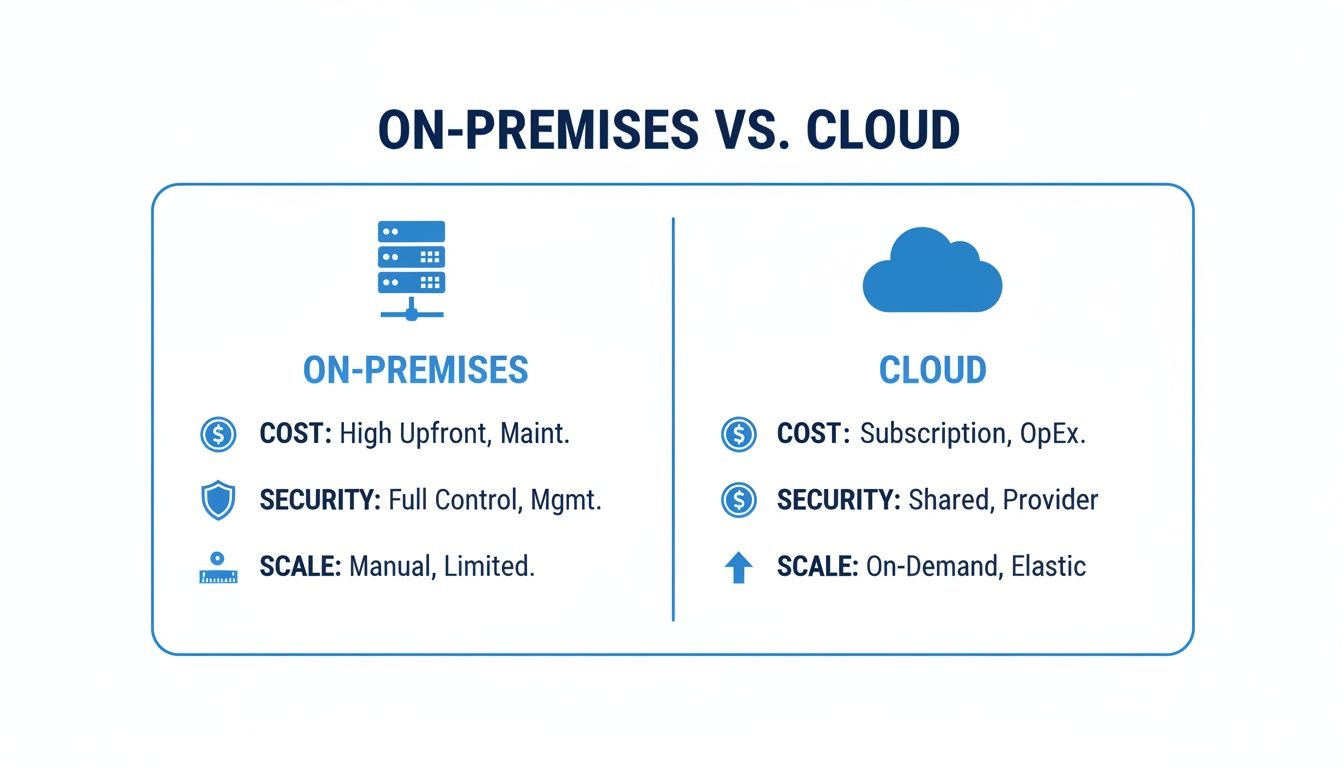
As you can see, the cloud's operational spending model and built-in flexibility are a world away from the capital-heavy, rigid nature of traditional on-premises IT.
Unpacking Cloud TCO
The cloud’s TCO is mostly an operational expense, but it’s far from a simple, single monthly bill. A "lift and shift" migration without careful planning can lead to significant bill shock. A realistic cloud TCO needs to factor in:
- Subscription Fees: This is the core cost for the compute, storage, and networking resources you use, typically billed monthly or annually.
- Data Egress Fees: This is a big one that catches many people out. Cloud providers usually don’t charge for data coming in, but they almost always charge for data going out. For data-heavy applications, these fees can become a huge, unexpected expense.
- Management and Optimisation: The provider manages the hardware, but you still need expertise to configure, secure, and optimise your cloud environment. This might mean training your team, hiring new specialists, or bringing in structured IT support. Understanding what's involved is vital, as we explain in our guide on the benefits of managed IT services.
- Third-Party Tools: You’ll likely need additional tools for cost management, security monitoring, or performance analytics, all of which add to your monthly operational spend.
Investment trends in the UK show exactly how these costs scale. Small and mid-sized businesses (SMBs) spend an average of $21,000 per year on cloud services. In sharp contrast, large enterprises now invest a staggering $14.3 million annually—a 9% year-on-year increase. This gap isn't just about company size; it reflects the sheer complexity of the cloud infrastructure that larger organisations require.
Calculating TCO forces a shift in mindset. It moves the on-premises vs cloud conversation from "Which is cheaper to buy?" to "Which delivers the most value over its lifetime?"
Ultimately, a detailed TCO analysis is the only way to get the clarity needed to choose the right solution for your business. It ensures your IT investment is sustainable and helps you reach your long-term goals. Without that complete financial picture, you're just guessing.
Real-World Use Cases for On-Premises and Cloud
Moving the on-premises versus cloud debate out of theory and into the real world means looking at actual business scenarios. The best choice isn’t about which technology is fundamentally "better," but which model properly supports a specific operational need. For some, the absolute control of on-premises is non-negotiable; for others, the cloud's agility is the only way forward.
By grounding this comparison in familiar contexts, you can map your organisation’s needs to the infrastructure that will genuinely help you succeed.
When On-Premises Remains the Right Choice
Despite the huge shift towards the cloud, there are still critical situations where keeping your infrastructure on-site is the most sensible and effective strategy. These scenarios are usually driven by extreme performance requirements, strict regulations, or the sheer difficulty of migrating legacy systems.
Here’s where on-premises still comes out on top:
- Ultra-Low Latency Operations: For applications where every millisecond is crucial—think high-frequency financial trading, real-time factory floor controls, or high-resolution video editing—the physical proximity of on-premises servers delivers a level of speed the cloud just can't match.
- Strict Data Sovereignty and Compliance: Many government, defence, or healthcare organisations in the UK operate under mandates that require sensitive data to stay within a specific physical building or national border. On-premises provides the most straightforward and direct path to proving compliance.
- Complex or "Un-migratable" Legacy Systems: Some businesses depend on vital, decades-old applications that were never designed for a cloud environment. The cost, risk, and sheer complexity of rebuilding these systems can easily outweigh any potential benefits, leaving on-premises as the only viable option.
In these situations, the choice is driven by necessity, not trends. The need for speed, control, or system compatibility creates clear boundaries that make on-premises the default, most responsible decision. It’s a reminder that infrastructure should always follow business function.
Expert guidance is often needed to build a modern and secure on-premise environment that can still talk to future systems, ensuring it remains viable for the long haul.
Where the Cloud Is the Clear Winner
On the flip side, the cloud's inherent strengths in scalability, global reach, and resilience make it the undisputed champion for a huge range of modern business needs. Organisations that are focused on growth, international expansion, and operational efficiency will almost always find the cloud is a better fit.
The cloud is the perfect solution for:
- Businesses with Fluctuating Demand: Think of e-commerce sites hitting seasonal peaks, media companies launching a viral campaign, or development teams spinning up temporary test environments. The cloud's elasticity means you can scale resources up and down instantly, preventing you from wasting money on hardware that’s sitting idle.
- Rapid Global Deployment: For companies pushing into new international markets, the cloud offers an instant global presence. You can launch applications in data centres across the world in minutes, giving customers everywhere a fast, low-latency experience without laying a single brick.
- Disaster Recovery and Business Continuity: Cloud providers offer incredibly robust, geographically distributed backup and DR services. These are far more advanced and cost-effective than what most businesses could ever build themselves. For any organisation that simply cannot afford downtime, this built-in resilience is a primary reason to adopt the cloud.
- Fostering Innovation and Agility: Startups and dev-focused teams use the cloud to experiment, fail fast, and iterate quickly. Having pay-as-you-go access to cutting-edge services like AI, machine learning, and big data analytics lets them innovate without needing massive upfront capital investment.
Hybrid Cloud and Strategic Repatriation: A More Nuanced Approach

The old on-premises versus cloud debate is starting to feel dated. Smart organisations now understand the conversation isn't about picking one over the other. It's about intelligent workload placement, which has paved the way for the hybrid cloud—a pragmatic blend of private infrastructure and public cloud services.
With a hybrid setup, you can craft a genuine "best-of-both-worlds" ecosystem. Your most sensitive data or latency-critical applications can stay safely on-premises, while you tap into the public cloud for its near-infinite scalability, global presence, and powerful disaster recovery options. It’s the control of on-prem with the agility of the cloud.
This isn't just a niche strategy anymore; it's rapidly becoming the default for modern IT. In the UK, 54% of enterprises now run their mission-critical workloads in a hybrid environment. This shift is all about gaining better security flexibility, tighter cost control, and more direct governance over critical data. You can find more detail on this trend in the latest cloud adoption reports.
The Power of a Hybrid Strategy
A properly executed hybrid cloud isn't just a technical configuration; it’s a strategic business advantage. It gives you a flexible foundation that can adapt to shifting market demands, new regulations, and emerging technologies without boxing you into a single solution.
Here’s what that looks like in practice:
- Optimal Workload Placement: You get to run every application where it makes the most sense. A customer-facing web app might live in the cloud to handle traffic spikes, while a critical manufacturing system stays on-prem for maximum stability and control.
- Enhanced Security and Compliance: This model makes it far easier to meet strict data residency laws by keeping specific datasets on your own hardware, all while using the cloud’s advanced security tools for everything else.
- Cost Optimisation: You can stop over-provisioning expensive on-premise hardware just in case of a surge. Instead, use the cloud’s pay-as-you-go model to handle demand spikes, a practice known as "cloud bursting," and only pay for what you actually use.
A mature hybrid strategy changes the question from "where should our IT live?" to "where does each workload deliver the most value?" It's about building an infrastructure that’s perfectly aligned with your business goals, not just your tech preferences.
The Rise of Strategic Repatriation
As hybrid models have become more common, another interesting trend has appeared: cloud repatriation. This is the process of deliberately moving specific applications or data back from the public cloud to an on-premises or private cloud environment. It might sound like a step backwards, but it’s often a sign of a highly mature and cost-conscious cloud strategy.
Organisations typically decide to bring workloads back in-house for a few key reasons:
- Unexpected Costs: The pay-as-you-go model is great for fluctuating demand, but it can become incredibly expensive for stable, predictable workloads. Data egress fees—the cost of moving data out of the cloud—can be a particularly nasty surprise.
- Performance Bottlenecks: For some applications, the latency of a public cloud connection just isn't good enough. When every millisecond counts, moving back to on-site hardware can make a significant difference.
- Evolving Security Posture: A change in compliance rules or a strategic decision to gain more direct control over security protocols can also trigger a repatriation project.
Making these complex decisions requires a deep understanding of both worlds. Whether you're designing a seamless hybrid ecosystem or executing a repatriation project without disrupting the business, it often takes structured IT support to ensure the final architecture is secure, cost-effective, and ready for whatever comes next.
Finding Your Way: A Framework for the Right Infrastructure Decision
The on-premises vs cloud debate is never a simple one. There's rarely a single, universally correct answer because the "best" infrastructure isn't a product you can buy off the shelf. Instead, it’s an environment carefully shaped around your specific business reality. To get from theory to a practical decision, you need a way to weigh your operational needs against your strategic goals.
This starts with an honest assessment of your organisation. By asking the right questions, you can cut through the marketing hype and pinpoint which model—on-premises, cloud, or a hybrid of the two—truly fits your organisation. Answering these questions brings the clarity you need to build a foundation that's secure, scalable, and genuinely ready for the future.
The Essential Decision Checklist
Before you commit to a path, it’s vital to work through these critical evaluation points. Each question is designed to show you how the core features of on-premise and cloud infrastructure map onto your real-world situation, helping you sidestep common mistakes and make a much more informed choice.
-
What are our true budget constraints?
Think beyond the initial setup cost. Can your business absorb a significant upfront capital expense (CapEx) for hardware, or does a predictable monthly operational expense (OpEx) model align better with your cash flow? -
What is our genuine security and compliance posture?
Do you have the in-house expertise and resources to manage every single aspect of physical and digital security, 24/7? Or would your data be better protected by the immense security investments of a major cloud provider under a shared responsibility model? -
How critical is scalability to our business plan?
Are your workloads stable and predictable, or do you deal with seasonal spikes and sudden demand? This will tell you whether the slower, manual scaling of on-premises is adequate, or if the instant elasticity of the cloud is an absolute must-have for growth. -
What are our long-term strategic goals?
Look at your five-year plan. Are you gearing up for rapid expansion, breaking into new markets, or trying to build a culture of fast-paced innovation? Making sure your infrastructure aligns with these goals ensures it helps you get there, rather than holding you back.
The most effective infrastructure strategy is one that directly supports your business objectives. It’s a strategic asset that should provide a competitive advantage, whether through cost efficiency, operational agility, or enhanced security.
Running through this framework will shine a light on the most logical path for your organisation. The goal isn't just to solve today's problems, but to choose a foundation that gives you the flexibility to seize tomorrow's opportunities. Making this call correctly demands careful planning and a deep understanding of both the technical and business implications—which is exactly where structured, expert IT guidance proves its worth for long-term success.
Your Questions, Answered
When you're weighing on-premises vs cloud, the big-picture comparisons are useful, but the decision often comes down to specific, practical questions. Here are the answers to the queries we hear most often from business leaders trying to navigate this choice.
Which Is Actually More Secure: On-Premises or Cloud?
This is a critical question, and the honest answer is: it's not about the location; it's about the execution. Having servers on-site gives you total physical control, which feels secure. But that control comes with a heavy burden—you are single-handedly responsible for every security layer, from the lock on the server room door to the firewall configuration and 24/7 threat monitoring.
Cloud providers like Microsoft Azure and AWS operate on a shared responsibility model. They pour billions into physical and network security, employing armies of the world's best experts to defend their infrastructure. The truly 'more secure' option depends entirely on whether your in-house team has the budget, expertise, and resources to build and manage a security programme that can rival theirs.
What Are the Biggest Hidden Costs of Cloud Migration?
The pay-as-you-go cloud model looks incredibly attractive on paper, but a few 'gotcha' costs can derail your budget if you aren't prepared for them. The ones we see catch businesses out most often are:
- Data Egress Fees: These are the charges for moving your data out of the cloud. If your business regularly transfers large datasets back to your own systems or to another service, these fees can quickly become a nasty surprise.
- Third-Party Management Tools: The native tools provided by cloud platforms are good, but you'll often need specialised third-party software for granular cost management, advanced security monitoring, or performance analytics. These add to your monthly operational spend.
- The Skills Gap: Don't underestimate this one. The cost of retraining your existing IT team or hiring new people with deep cloud expertise is a very real, and often substantial, financial hit.
Without meticulous planning and ongoing cost governance, you can find that the predictable capital expense of on-prem has been swapped for unpredictable monthly bills that eat away at your expected savings.
Can I Move Back to On-Premises if the Cloud Doesn’t Work Out?
Yes, you absolutely can. The process is known as cloud repatriation, and we're seeing it happen more frequently as businesses fine-tune their strategies. Be warned, though: it's not a simple rollback. Migrating applications and live data from a cloud environment back to physical hardware is a complex, high-stakes project that needs to be planned meticulously to avoid business disruption and downtime.
Frankly, the potential pain of repatriation is a key reason so many organisations are now opting for a hybrid strategy from day one. A hybrid approach gives you the flexibility to place workloads where they make the most sense, without getting locked into a single platform for the long haul.
Is a Hybrid Cloud Solution Difficult to Manage?
Managing a hybrid environment is undoubtedly more complex than sticking to a single platform. You're essentially bridging two fundamentally different worlds, and that requires specialised tools to get a unified view of monitoring, enforce consistent security policies, and manage data flows seamlessly.
Because of this inherent complexity, many businesses find that working with an external IT partner is the most effective way forward. Getting expert help ensures the hybrid architecture is designed and managed correctly from the start, giving you a truly seamless, secure, and future-ready IT foundation.
Making the right infrastructure call demands a clear-eyed view of your business goals and a solid grasp of the technical realities. At ZachSys IT Solutions, we provide the strategic guidance to help you design, build, and manage an IT environment that's secure, scalable, and perfectly aligned with your long-term success.
Book a free consultation to start building your future-ready infrastructure